


JIRA Search
This Snap performs a JIRA advanced search by executing a JIRA Query
Language (JQL) statement.
Supported Accounts
- This is a Read-type Snap.
 Works in Ultra Tasks
- Atlassian has announced the deprecation of the JIRA REST API v2, effective May 1, 2025. If your pipelines use the JIRA REST API v2, they might not function properly. Hence, we recommend updating the API Version field in the Search Snap to 3 to ensure compatibility with the API v3.
- With the JIRA REST API v3, the output structure for the
field description,field comment, andworklog commentkeys in the JIRA Search Snap has changed. If your pipelines rely on the output of the Search Snap downstream Snaps, they might not function properly.
Snap views
| Type | Description | Examples of upstream and downstream Snaps |
|---|---|---|
| Input | This Snap has at most one document input view and receives documents in the view. Each document contains data needed to evaluate the JavaScript expression in the Java Query Language (JQL) query property. | |
| Output | This Snap has exactly one document output view and produces documents in the view. Each document contains the response data from the JIRA REST API service endpoint. | |
| Learn more about Error handling. | ||
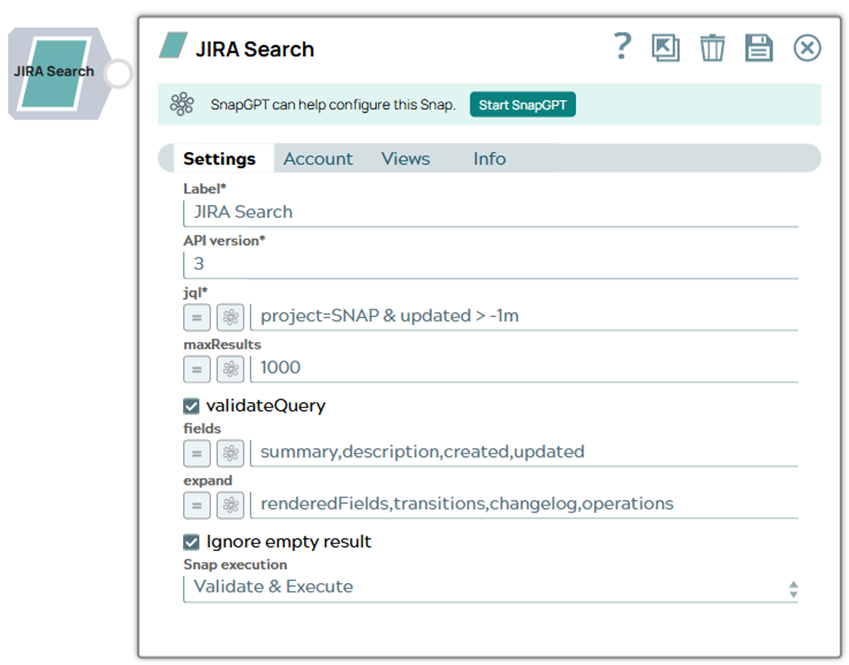
Snap settings
Note:
Learn about the common controls in the Snap settings dialog.
| Field/Field set | Description |
|---|---|
|
Label String |
Required.Specify a unique name for the Snap. Modify this to
be more appropriate, especially if there are more than one of the same Snap in the
pipeline.
Default value: JIRA Search Example: Search Snap Issues |
API version
String/Expression |
Required. The JIRA REST API version number.
Note: Atlassian has announced the deprecation of the version 2 of JIRA REST API
effective May 1, 2025. Hence, if your pipelines use the version 2 of the
JIRA REST API, they might not work. We recommend updating the API
Version field in the Search Snap to 3 to enforce the use of version
3 API for the search operation.
Default value: 2 Example: 2 |
JQL
String/Expression |
Required. The JQL query statement. It can be a JavaScript
expression. See JIRA's Advanced Searching documentation for more
information on building query statements. Default value: None. Example: project=SNAP & updated > -1m |
maxResults
String/Expression |
The number of issues to return per page. The maximum allowable value is imposed
by the JIRA property 'jira.search.views.default.max'. Note:
Maximum value 5000 Default value: None. Example: 100 |
validateQuery
Checkbox |
Select this option to validate the JQL query.
Default status: Selected |
fields
String/Expression |
A comma-separated list of fields to return for each issue. By default, all
navigable fields are returned. Default value: None. Example: summary,description,created,updated |
expand
String/Expression |
A comma-separated list of the parameters to expand. Default value: None. Example: renderedFields,transitions,changelog,operations |
Ignore empty result
Checkbox |
When a JIRA operation produces no result, this property determines if the input document should be passed through to the output view or not. If selected, no document will be written to the output view. If not selected, the input document will be passed through.
Default status: Selected |
|
Snap execution Dropdown list
|
Choose one of the three modes in
which the Snap executes. Available options are:
Default value: Execute only Example: Validate & Execute |
Troubleshooting
| Error | Reason | Resolution |
|---|---|---|
| REST API service endpoint returned error result: status code = 410 | The requested API has been removed by Atlassian. | Update the API URL from /rest/api/2/search to /rest/api/3/search/jql to ensure compatibility with the new API version. |