


Configure Azure Repos and the Git Integration
Configuration for the SnapLogic Git Integration to use Azure Repos.
To use Azure Repos, register SnapLogic with Azure Repos and configure the Git Integration feature in
your SnapLogic environment (Org). Each Azure Repos registration applies to one control plane
(elastic.snaplogic.com, uat.elastic.snaplogic.com, or
emea.snaplogic.com) and covers all environments on that control plane.
- In Azure Repos, you need:
- One or more Azure Repos repositories for SnapLogic assets
- An application registered with Microsoft Entra to handle user authentication requests for the repo access
- Azure organization administrator permissions to configure the organization settings and to register an app
- In the SnapLogic environment:
- A subscription to the SnapLogic Microsoft Azure DevOps Repository feature for each environment
- Environment admin permissions
Steps
- In Azure Repos, follow the instructions
to register SnapLogic as a trusted application.
Use the following values for application registration:
Field Value Application website https://control-plane-namewherecontrol-plane-nameis the control plane you are using.- elastic.snaplogic.com
- uat.elastic.snaplogic.com
- emea.snaplogic.com
Authorization callback URL https://control-plane-name/api/1/rest/asset/app/oauthcallbackExample:
https://cdn.control-plane-name/api/1/rest/asset/app/oauthcallbackWhere
control-plane-nameis the control plane you are using. For example:- elastic.snaplogic.com
- uat.elastic.snaplogic.com
- emea.snaplogic.com
Authorized scopes The following selections are required: - User profile (write)
- Code (full)
- Click Create application. The Application Settings page opens. You will need information from this Application Settings page to configure the Git Integration in Admin Manager.
- From the Azure DevOps console, navigate to Organization
Settings for the appropriate project. In the
PoliciesApplication connection policies section,
toggle On the Third-party application access via OAuth
setting.
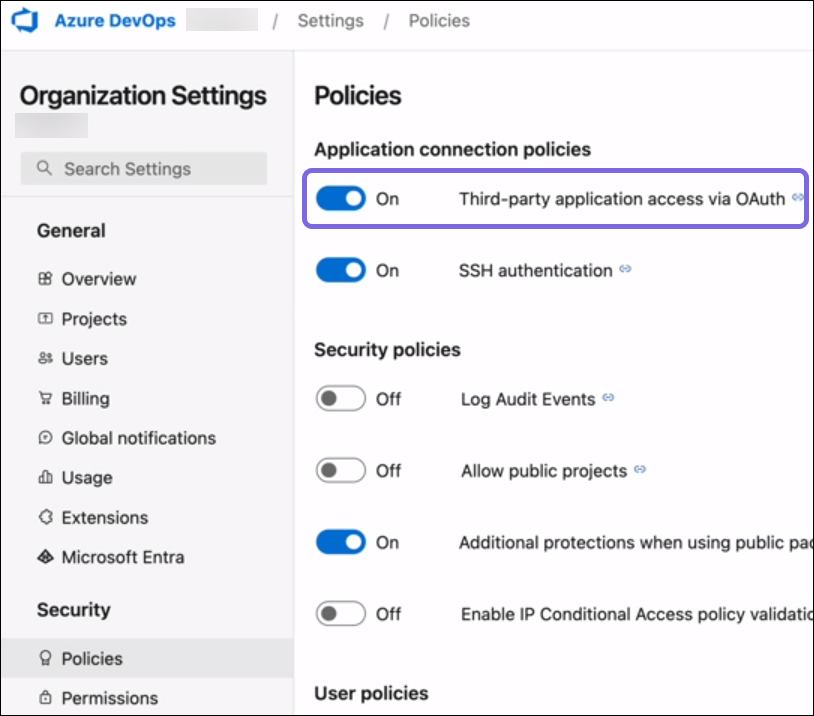
Important: Enable third-party access only for the project that will track SnapLogic assets. -
Admin Manager
In SnapLogic Admin Manager, navigate to System Configuration and select Git Integration. In the Git Integration page, configure the settings for Git integration with Azure Repos.
- From the Git integration type dropdown, select Microsoft Azure with Entra ID.
- Configure the fields as described below. Copy the first four values from the Azure Repos Application Settings page and set the remaining fields as shown.
Admin Manager field Value 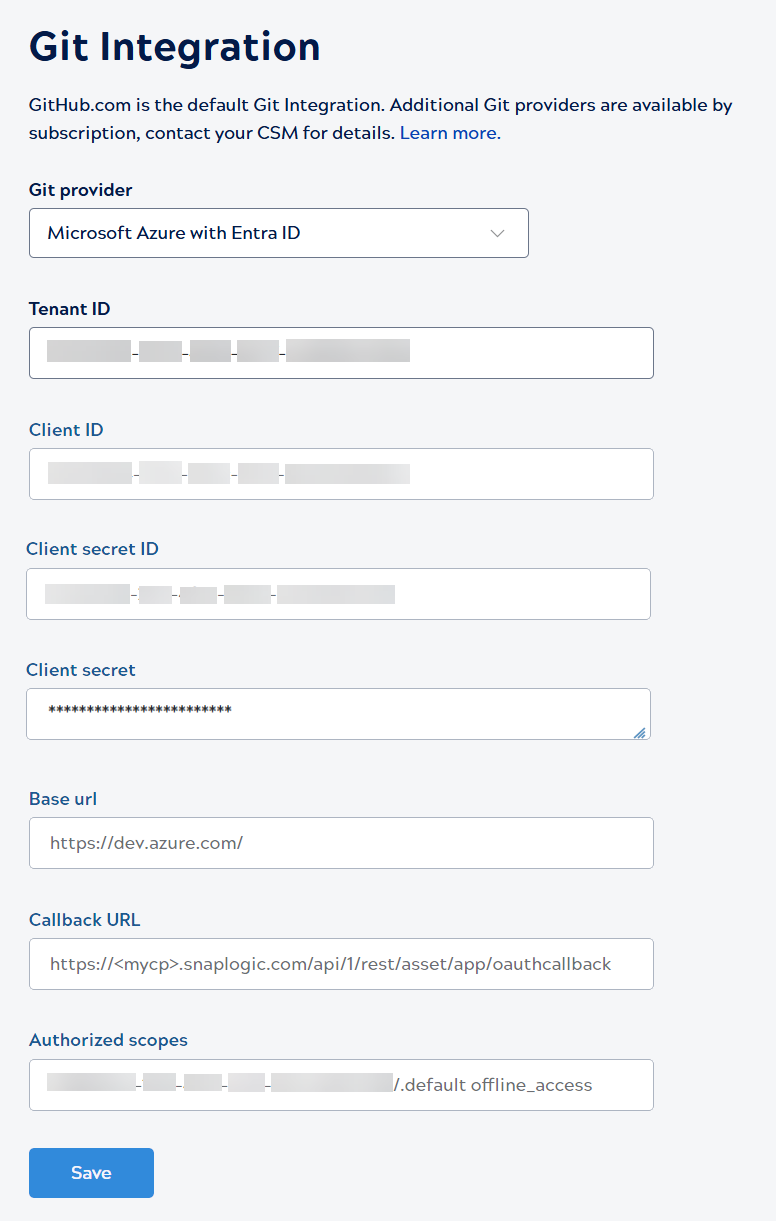
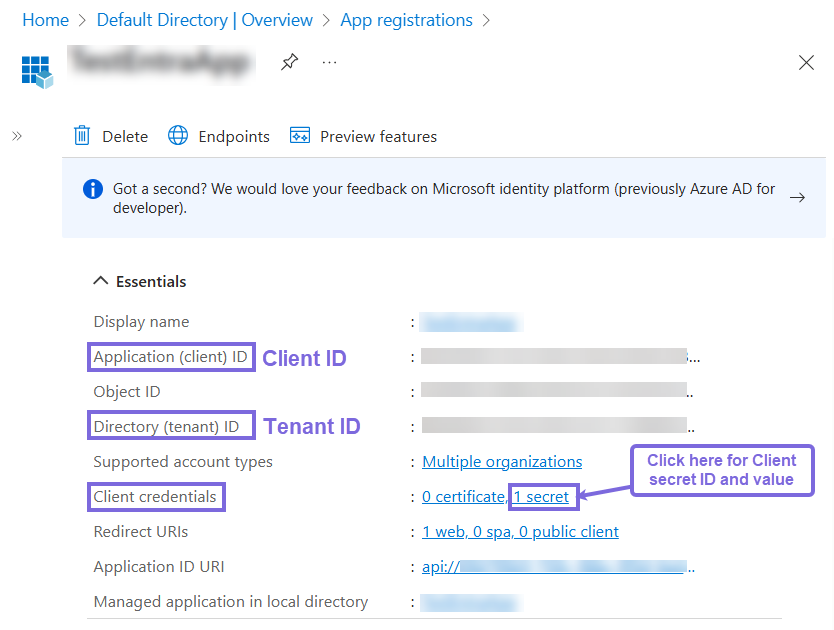
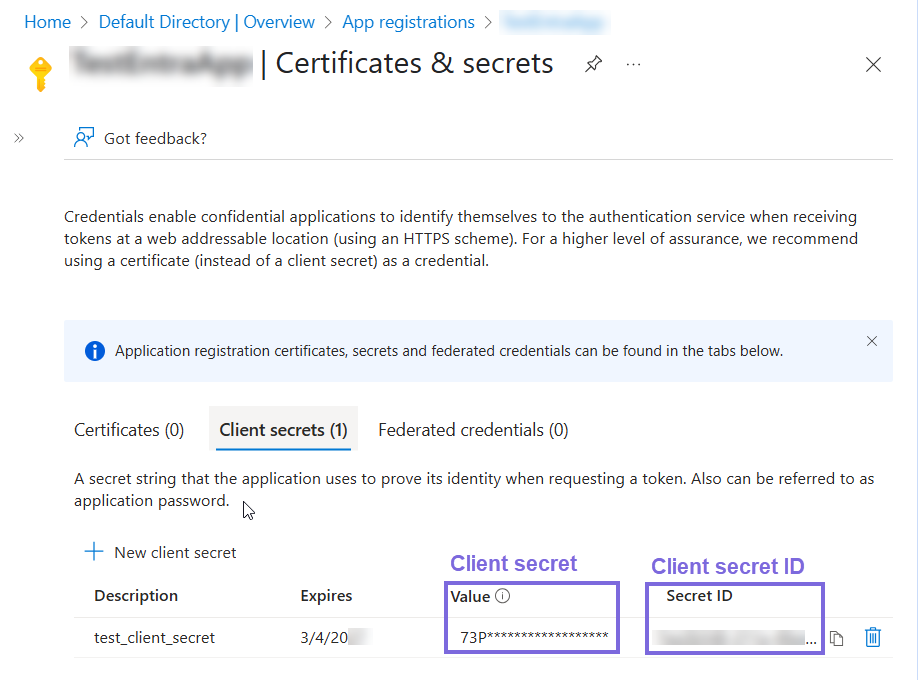
Tenant ID Directory (tenant) ID Client ID Application (client) ID Client secret ID Client secret Base URL Accept the default
https://dev.azure.com/.Callback URL Set to
https://<control-plane-name>/api/1/rest/asset/app/oauthcallback.Where
<control-plane-name>is the control plane you are using. For example:- elastic.snaplogic.com
- uat.elastic.snaplogic.com
- emea.snaplogic.com
Authorized Scopes Enter both of the following scopes, separated by a space: 499b84ac-1321-427f-aa17-267ca6975798/.defaultoffline_access
The GUID (
499b84ac-1321-427f-aa17-267ca6975798) is a fixed Microsoft-defined resource ID for Azure DevOps. It is the same for all configurations — do not replace it with your client ID.