


Assigning Team Based on Position
This pipeline demonstrates how you can use the Categorical to Numeric Snap to assign numeric team values to employees based on their position, which is a categorical field.

-
Add the Profile Snap to compute statistics
on the input data.
This Snap calculates the value distribution of the
$positionfield, which is required by the encoding policies in the next Snap.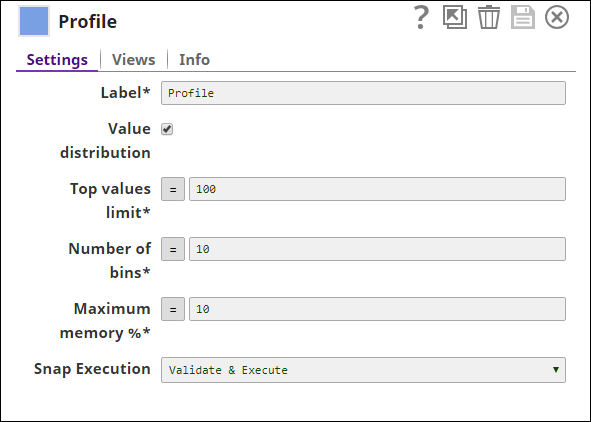
-
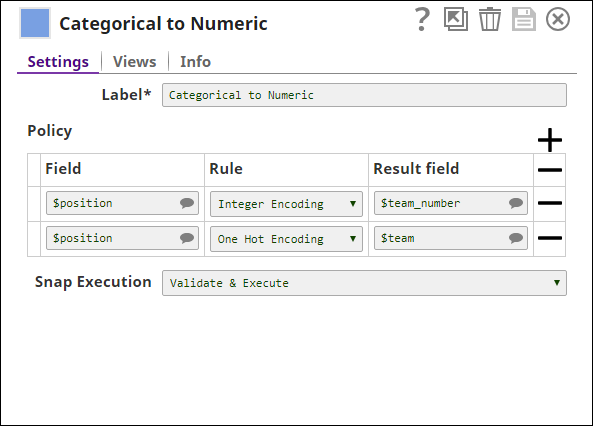
Configure the Categorical to Numeric Snap to encode categorical fields into numeric values.
The Snap is configured with two encoding policies:
- Integer Encoding: Maps each unique
$positionvalue to an integer and stores it in$team_number. - One Hot Encoding: Creates binary fields
$team_instructional_designerand$team_technical_writerto indicate presence of those positions.
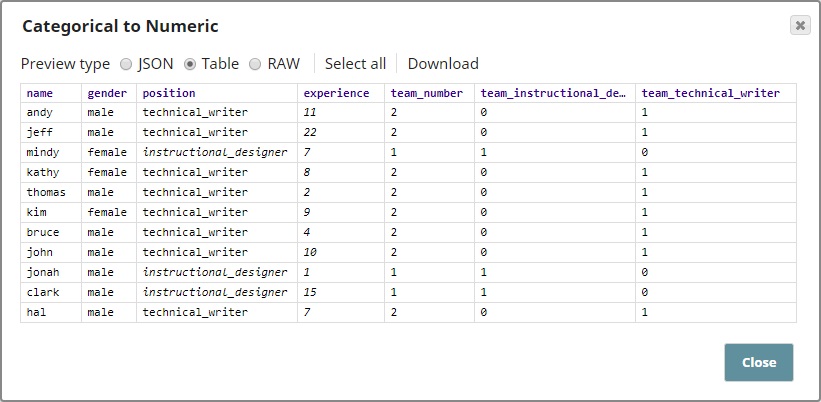
Note: The output contains the following new fields:$team_number: Result of Integer Encoding for the$positionfield.$team_instructional_designerand$team_technical_writer: Result of One Hot Encoding policies.
- Integer Encoding: Maps each unique
- Download and import the SLP file into your Environment.
- Configure Snap accounts.
- Provide Pipeline parameters, if any.