


SnapGPT thinking modes
SnapGPT offers two thinking modes that optimize AI processing for different tasks: Extended thinking for complex pipeline generation and Standard thinking for quick interactions.
SnapGPT provides two thinking modes to balance response time and output quality based on your task requirements. You can select the thinking mode from the dropdown at the bottom of the SnapGPT prompt panel.
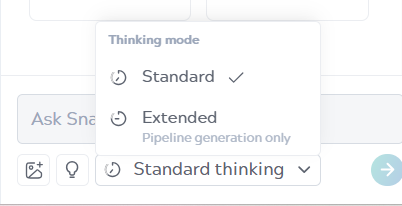
Standard thinking mode
The Standard thinking mode is the default mode that provides quick responses for most SnapGPT tasks that don't require complex pipeline generation.
Use the Standard thinking mode when:
- Describing pipelines: Generating documentation or explanations of existing pipelines.
- Analyzing pipelines: Reviewing pipelines for errors, warnings, or improvement opportunities.
- Asking questions: Getting help with SnapLogic features, best practices, and troubleshooting.
- Refining pipelines: Making targeted updates to existing pipelines, such as renaming Snaps or adding specific functionality.
- Generating expressions: Creating expressions for Mapper Snaps or expression-enabled fields.
- Generating SQL queries: Creating SQL or SOQL statements for Execute Snaps.
- Quick iterations: Prototyping an exploratory work where speed matters more than comprehensive optimization.
Example use cases
- Describe what this pipeline does.
- Analyze this pipeline for potential issues.
- How do I schedule a pipeline to run every day at 9 AM UTC?
- Add error handling to the REST Get Snap.
- Generate an expression to extract the domain from an email address.
- Create a SQL query to select all orders from the last 30 days.
Extended thinking mode
The Extended thinking mode uses advanced AI reasoning to generate comprehensive and optimized pipelines. This mode takes additional processing time to analyze your prompt more thoroughly and produce higher-quality results.
Use the Extended thinking mode when:
- Generating new pipelines: Creating pipelines from scratch, especially for complex integration scenarios.
- Working with complex requirements: Writing prompts with multiple data sources, transformations, or business logic.
- Enterprise-grade integrations: Building pipelines that require robust error handling, data validation, and optimization.
- Multi-step data workflows: Involving multiple Snaps, conditional logic, or data routing.
- Production-ready output: Requiring pipelines that incorporate best practices and learnings.
Example use cases
- Generate a pipeline to extract customer data from Salesforce, transform it based on regional requirements, and load it into both Snowflake for analytics and BigQuery for reporting.
- Create a pipeline to read CSV files from AWS S3, validate data quality, handle errors gracefully, and perform incremental updates to a PostgreSQL database.
- Build a pipeline to integrate multiple REST APIs, join the data, apply business rules, and output to both a JSON file and a database table.
Best practices
- Match mode to task: Use the Extended thinking mode for pipeline generation and the Standard thinking mode for other skills.
- Be patient with Extended mode: The additional processing time results in better quality output.
- Provide detailed prompts: In the Extended mode, detailed prompts lead to better results. See Prompt tips for guidance.
- Consider complexity: For simple two- or three-Snap pipelines, Standard mode might be sufficient.