


Sort
Overview
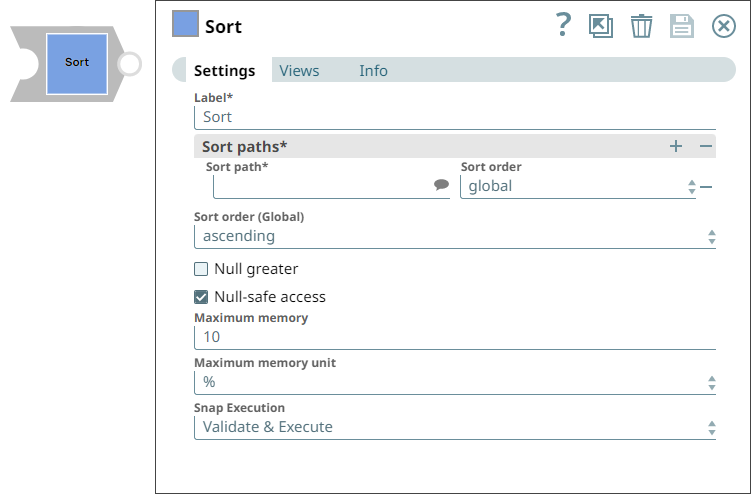
The Sort Snap is a Transform-type Snap that sorts the input document streams in the memory buffer.
- This is a Transform-type Snap.
 Does not support Ultra Tasks
Snap views
| Type | Description | Examples of upstream and downstream Snaps |
|---|---|---|
| Input | The Snap reads input documents and sorts them in a memory buffer. | Mapper |
| Output | This Snap sorts a document stream which show up in the sort path list. | Join |
| Learn more about Error handling. | ||
Snap settings
- Expression icon (
 ): Allows using
JavaScript syntax to access SnapLogic Expressions to set field values dynamically (if
enabled). If disabled, you can provide a static value. Learn more.
): Allows using
JavaScript syntax to access SnapLogic Expressions to set field values dynamically (if
enabled). If disabled, you can provide a static value. Learn more. - SnapGPT (
 ): Generates SnapLogic Expressions
based on natural language using SnapGPT. Learn
more.
): Generates SnapLogic Expressions
based on natural language using SnapGPT. Learn
more. - Suggestion icon (
 ): Populates a
list of values dynamically based on your Snap configuration. You can select only one
attribute at a time using the icon. Type into the field if it supports a comma-separated
list of values.
): Populates a
list of values dynamically based on your Snap configuration. You can select only one
attribute at a time using the icon. Type into the field if it supports a comma-separated
list of values. - Upload
 : Uploads files. Learn more.
| Field/Field set | Type | Description |
|---|---|---|
Label
|
String |
Required. Specify a unique name for the Snap. Modify this to be more appropriate, especially if more than one of the same Snaps is in the pipeline. Default value: Sort Example: Sort Snap |
| Sort Paths | Required. Use this field set to provide the list of paths to sort on. |
|
| Sort Path | String/Suggestion | Required.Paths of values in the document to sort on. For
example, if the sort paths are $first_name and
$last_name, then the value at first_name is
sorted first. Note: This field supports only scalar values such as string, number,
date and so on. Default value: None Example: $person.first_name |
| Sort order | Dropdown list | Required. Order of sorting. The available options are:
Note: If you select the option global, the Sort order (Global)
property becomes functional for the corresponding Sort path. Default value: None Example: $person.first_name |
| Sort Order (Global) | Dropdown list | Sort the specified values in ascending or descending order. Default value: ascending Example: descending |
| Null greater | Checkbox | Select this checkbox to allow the Snap to consider null value greater than the
non-null values. When you select this checkbox, null values are placed last when
sorted in the ascending order.
Note: An empty string is not considered as null and is always smaller than
non-empty strings. Default status: Deselected |
| Null-safe access | Checkbox | Select this checkbox if you consider the values of non-existent or incorrect
sort paths as null. If unselected, the Snap validates each input document to throw
errors for non-existent or incorrect sort paths. Clearing this property will result
in a lower performance. Default status: Deselected |
| Maximum memory | Integer | Specify the maximum memory to compute the size of the internal memory buffer
for the external merge sort. The value must be in MB or %, which you can specify in
the Maximum memory unit. If its unit is %, the value of this property is the
percentage of maximum used memory as compared to the maximum system memory. Note:
Default value: 10 Example: 20 |
| Maximum memory unit | Dropdown list |
Select the appropriate unit for the Maximum memory property.
Note: The buffer size ranges from 10 MB to 10 GB.
Default value: % Example: MB |
| Minimum memory (MB) | String/Expression | If the available memory is less than this property value while processing
input documents, the Snap stops fetching the next input document until more memory
is available. This feature is disabled if this property value is 0. Default value: 500 Example: 750 |
| Minimum free disk space (MB) | String/Expression | If the free disk space is less than this property value, the Snap stops
processing input documents until more free disk space is available. This feature is
disabled if this property value is 0. Default value: 500 Example: 750 |
| Out-of-resource timeout (minutes) | String/Expression | If the Snap pauses longer than this property value while waiting for more
available memory, it throws an exception to prevent the system from running out of
memory or disk space. Default value: 30 Example: 20 |
| Snap execution
|
Dropdown list |
Choose one of the three modes in
which the Snap executes. Available options are:
Default value: Validate & Execute Example: Execute only |
Temporary Files
During execution, data processing on Snaplex nodes occurs principally in-memory as streaming and is unencrypted. When larger datasets are processed that exceeds the available compute memory, the Snap writes Pipeline data to local storage as unencrypted to optimize the performance. These temporary files are deleted when the Snap/Pipeline execution completes. You can configure the temporary data's location in the Global properties table of the Snaplex's node properties, which can also help avoid Pipeline errors due to the unavailability of space. For more information, see Configuration Options.
Troubleshooting
Failed to sort data at the input document.
Possible Causes
Insufficient free disk space to stage sort data into temporary files.
Possible Solutions
Increase the free disk space.
Input document does not contain sort path.
Possible Causes
If Null-safe access is false, all input documents should contain keys for sort paths.
Possible Solutions
Address the reported issue.