


JWT Generate
Overview
This Snap generates JSON Web Tokens (JWT). Together with the JWT Validate Snap, this Snap allows pipelines the ability to issue and use limited scope access tokens.
JSON Web Token (JWT) is an open standard that defines a compact and self-contained way for securely transmitting information (claims) between parties. This information is stored in the token as a JSON object, and is signed using a secret (with HMAC algorithm) or private key (with RSA Algorithm). All the information necessary to validate the token and its contents is contained within the JWT, thereby avoiding an expensive resource look up (for example, a database look up) during token validation.
The Snap properties allow users to customize what information gets embedded in the token.
- This is a Read-type Snap.
 Works in Ultra Tasks
Known issues
The RSA private key size might not match the RSA suggested algorithm tailing number.
For example: generating a private key with keysize=512 can be used with
RS256, but this key cannot be used with algorithm PS256.
Snap views
| Type | Description | Examples of upstream and downstream Snaps |
|---|---|---|
| Input | This Snap has at most one document input view. This Snap can have an upstream Snap that passes a document. The upstream Snap allows users an opportunity to authenticate internal users (for example using a REST GET Snap). Additionally, the upstream Snap can also fetch or generate data that needs to be embedded in the JWT. |
|
| Output | This Snap has exactly one document output view. This Snap generates an output document that contains the access token. |
|
| Learn more about Error handling. | ||
Snap settings
- Expression icon (
 ): Allows using
pipeline parameters to set field values dynamically (if enabled). SnapLogic Expressions
are not supported. If disabled, you can provide a static value.
): Allows using
pipeline parameters to set field values dynamically (if enabled). SnapLogic Expressions
are not supported. If disabled, you can provide a static value. - SnapGPT (
 ): Generates SnapLogic Expressions
based on natural language using SnapGPT. Learn
more.
): Generates SnapLogic Expressions
based on natural language using SnapGPT. Learn
more. - Suggestion icon (
 ): Populates a
list of values dynamically based on your Snap configuration. You can select only one
attribute at a time using the icon. Type into the field if it supports a comma-separated
list of values.
): Populates a
list of values dynamically based on your Snap configuration. You can select only one
attribute at a time using the icon. Type into the field if it supports a comma-separated
list of values. - Upload
 : Uploads files. Learn more.
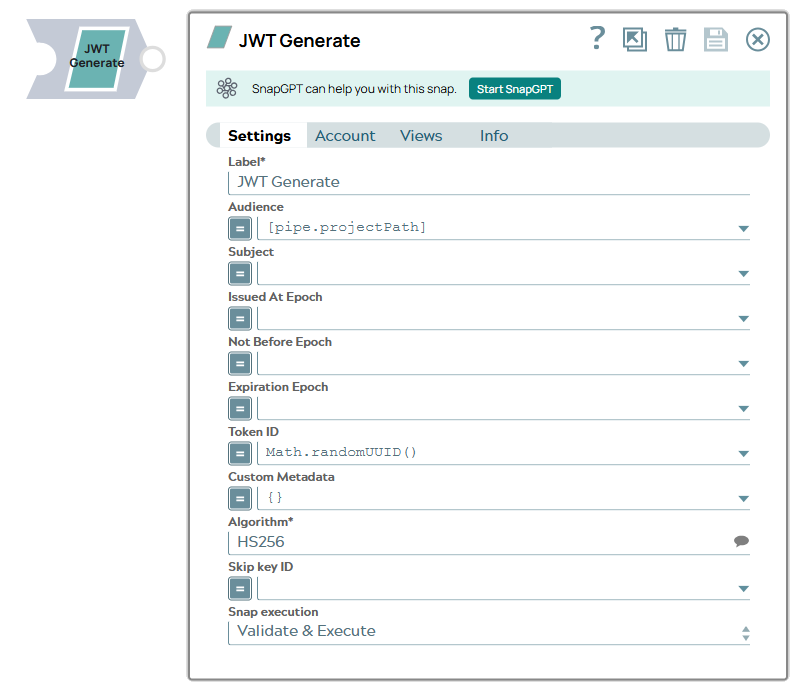
| Field/Field set | Type | Description |
|---|---|---|
Label
|
String | Required. Specify a unique name for the Snap. Modify this to be more appropriate, especially if more than one of the same Snaps is in the pipeline. Default value: JWT Generate Example: JWT Generate |
| Audience | Dropdown list/Expression |
The asset that the token should be valid for. Can be a string or a list of strings. Default value: pipe.projectPath |
| Subject | Dropdown list/Expression |
The entity (user, application, etc) that this token applies to. This could be used to specify internal / third-party users or applications that the token should be valid for. Default value: None. |
| Issued At Epoch | Dropdown list/Expression | Specify the time (in milliseconds since January 1st, 1970) that indicates
when the JWT was created. Warning: If the value is 0 or the field is
left blank, Snap considers the current instant in milliseconds. Default value: N/A Example: 1673515370515 |
| Not Before Epoch | Dropdown list/Expression | Specify the time (in milliseconds since January 1st, 1970) before which the
JWT remains invalid. Warning: If the value is 0 or the field is left
blank, Snap considers the current instant in milliseconds minus two
seconds. Default value: N/A Example: 1673515370513 |
| Expiration Epoch | Dropdown list/Expression | Specify the time (in milliseconds since January 1st, 1970) after which the JWT is invalid. Warning: If the value is 0 or the field is left
blank, Snap considers the current instant in milliseconds plus the TTL value from
the account. Default value: N/A Example: 1673515371515 |
| Token ID | Dropdown list/Expression | A unique identifier for the token. This field can be used to embed a unique
identifier for tracking across multiple systems. Default value: Math.randomUUID() |
| Custom Metadata | Dropdown list/Expression | Custom metadata to embed in token. This field is an Object / Map. For every key
value pair in this object, the key will form the name of the claim and the value
will be value of the claim. Default value: None. |
| Algorithm | String/Suggestion | Required. The hashing algorithm used to generate the
signature of the token. Options available include:
Default value: HS256 Alternatively, the hashing algorithm for the RSA key used to
generate the signature of the token includes the following options:
Default value: RS256 |
| Skip Key ID | Dropdown list/Expression | Select the checkbox (by disabling the Expression enabler) to skip the Key ID
parameter and remove it when generating the JWT. Warning: This property
allows you to provide or skip the Key ID in the JWT headers while generating the
token. By default, the checkbox is deselected, and Snap considers the Key ID as
the alias of the private key used in the account. If an API (such as Bloomberg) does not accept the Key ID, then select this
checkbox so that the Key ID is not used in JWT headers while generating the
token. |
| Snap execution
|
Dropdown list |
Choose one of the three modes in
which the Snap executes. Available options are:
Default value: Execute only Example: Validate & Execute |