


Conditional
Overview
You can use this Snap to mimic an IF statement in most programming languages. Each row of the conditional table is equivalent to an if/else if block in an if statement. The Default value property is equivalent to the else block. The first condition that evaluates to true has its value set into the provided target path, and no other conditions are evaluated. If no conditions evaluate to true, the default value (if set) is written. If Evaluate all is selected, the Snap evaluates all conditions and writes return values to their corresponding target paths.
Conditions and return values are created using the SnapLogic expression language. If no condition is set, no data flows through.
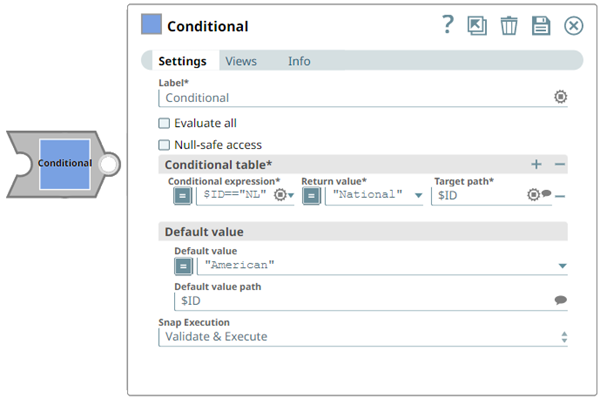
- This is a Transform-type Snap.
 Works in Ultra Tasks
Snap views
| Type | Description | Examples of upstream and downstream Snaps |
|---|---|---|
| Input | Document data that will be evaluated against configured conditions. | |
| Output | Document output with conditionally evaluated values mapped to the specified target paths. Example downstream Snaps include Mapper, Copy, Aggregate, Conditional, and Router. | |
| Learn more about Error handling. | ||
Snap settings
- Expression icon (
 ): Allows using
pipeline parameters to set field values dynamically (if enabled). SnapLogic Expressions
are not supported. If disabled, you can provide a static value.
): Allows using
pipeline parameters to set field values dynamically (if enabled). SnapLogic Expressions
are not supported. If disabled, you can provide a static value. - SnapGPT (
 ): Generates SnapLogic Expressions
based on natural language using SnapGPT. Learn
more.
): Generates SnapLogic Expressions
based on natural language using SnapGPT. Learn
more. - Suggestion icon (
 ): Populates a
list of values dynamically based on your Snap configuration. You can select only one
attribute at a time using the icon. Type into the field if it supports a comma-separated
list of values.
): Populates a
list of values dynamically based on your Snap configuration. You can select only one
attribute at a time using the icon. Type into the field if it supports a comma-separated
list of values. - Upload
 : Uploads files. Learn more.
| Field/Field set | Type | Description |
|---|---|---|
Label
|
String |
Required. Specify a unique name for the Snap. Modify this
to be more appropriate, especially if more than one of the same Snaps is in the
pipeline. Default value: Conditional Example: Conditional_test |
| Evaluate all | Checkbox | Select this checkbox to evaluate all the conditions and writes all the return
values to the target paths if the conditions evaluates to true. For example, select this checkbox, and select the condition as specified below: Conditional expression: $State == "CA" Return value: "California" Target path: $FullName Conditional expression: $id == 1 Return value: "found" Target path: $status If the input document has the following values:
then the output document displays as below: Default status: Deselected Example: Selected |
| Null-safe access | Checkbox | Select if you want to set the target value to null in case the source path does not exist. If you do not select this checkbox, then the Snap fails if the source path does not exist, ignores the record entirely, or writes the record to the error view depending on the setting of the error view property. For example, if you set the condition as $person.phonenumbers.pop() and target as $ lastphonenumber and do not select this checkbox, then it might result in an error in case person.phonenumbers does not exist on the source data. If you select this checkbox, then this option allows to write null to lastphonenumber. |
| Conditional table | Use this fieldset to specify the if conditions.
For example, the following if statement:can be given as these conditions: Condition1 Conditional expression: $State == "CA" Return value: "California" Target path: $FullName Condition2 Conditional expression: $State == "NJ" Return value: "New Jersey" Target path: $FullName |
|
| Conditional expression | String/Expression | Required. Specify the expression based on which the
condition is evaluated. Default value: None Example: $State == "CA" |
| Return value | String |
Specify the value to be returned if the condition evaluates to true. Default value: None Example: California |
| Target path | String | Specify the target path to which the return value has to be written. Default value: None Example: $FullName |
| Default value | String | Specify the default value to assign if none of the conditions evaluate to true,
else statement. For example: Default value: None Example: N/A |
| Default value path | String | Specify the target path to which the return value has to be written when none
of the conditions evaluate to true. Default value: None Example: $FullName |
| Snap execution
|
Dropdown list |
Choose one of the three modes in
which the Snap executes. Available options are:
Default value: Validate & Execute Example: Disabled |