


AgentCreator Architecture and Pipeline Design
AI agents
AI agents are autonomous software systems that shift the human role from performing tasks to directing outcomes. Unlike conventional AI tools that respond to individual prompts, agents are goal-oriented: you define an objective, and the agent determines and executes the steps to complete it. Key capabilities include:
- Workflow orchestration: Agents connect siloed tools and systems, moving data and triggering actions without manual intervention.
- Operational velocity: By automating routine cognitive work, agents reduce processing times by 20–80%, accelerating projects from start to completion.
An agent is built from modular layers: an LLM reasoning core, a planning module that sequences steps and replans on failure, memory for short-term context and long-term retrieval, and tool use that generates structured API calls to act on external systems. In complex workflows, multiple specialized agents collaborate, each handling a distinct part of the overall task.
The quality of an agent's output depends directly on the data it can access. Agents draw from connected data sources — internal systems, APIs, and indexed knowledge bases — to inform decisions, retrieve context, and determine the best path to an outcome. For an agent to be effective, that data must be accessible, well-structured, and retrievable at the time the agent needs it.
For high-stakes operations, Human-in-the-Loop (HITL) checkpoints pause execution until a human supervisor authorizes the action before the agent proceeds.
SnapLogic AgentCreator gives you a pipeline-based environment for building and deploying agents. The following sections explain the architecture and design patterns you use to build them.
Why build agents with SnapLogic AgentCreator
SnapLogic AgentCreator is built on the SnapLogic pipeline platform, giving your agents native access to the full library of SnapLogic Snaps. This means agents can connect to any data source, API, or system that SnapLogic supports — without custom integration code. Since the quality of an agent’s decisions depends on the data it can reach, this broad connectivity is a core advantage, and directly fulfills the data layer requirement that enables agents to retrieve context and make informed decisions.
In AgentCreator, an agent is a group of SnapLogic pipelines. This design supports agents at any level of complexity: from simple, goal-based agents powered by a single pipeline, to multilayered agents where specialized subagents each handle a distinct part of a larger workflow.
Because AgentCreator manages the agent’s back-end logic and data orchestration, you can pair it with any front-end interface your organization uses. For example, this solution uses Streamlit to power the user interface while AgentCreator handles the back-end APIs.
Agent architecture
A SnapLogic agent is composed of two pipeline types:
- Agent pipeline — Receives the user request, interacts with the LLM, and orchestrates the overall workflow.
- Tool pipelines — One or more pipelines that the Agent pipeline calls to perform specific actions, such as retrieving data, querying an API, or writing to a system. The Agent pipeline determines which tool pipelines to invoke based on the request and the LLM's reasoning.
This maps directly to the modular architecture that defines all AI agents: the Agent pipeline houses the LLM reasoning core and planning loop, while tool pipelines provide the tool use layer that allows the agent to act on external systems and data. Memory operates across both: short-term context — the user prompt and conversation history — is managed through the Prompt Composer in the Agent pipeline, while long-term retrieval, such as querying a knowledge base or indexed data store, is handled by tool pipelines that connect to those sources using SnapLogic Snaps.
For complex workflows, you can build multilayered agents by having an Agent pipeline call other Agent pipelines as subagents — each operating within its own defined role. This is how SnapLogic implements multi-agent systems.
Function Generator
Function Generator Snaps produce tool definitions — structured descriptions that tell the LLM which tools are available and what parameters are required to call them. By providing these definitions, the LLM can reason about which tool to invoke for a given request and how to pass the correct arguments. Function Generator Snaps are available per LLM vendor for Amazon Bedrock, Google Gemini, OpenAI, and Azure OpenAI, and in the LLM Utilities Snap Pack for tools based on OpenAPI specifications and APIM 3.0 services. When an agent requires multiple tools, you can use the Multi Pipeline Function Generator Snap to define and call multiple tool pipelines from a single Snap, streamlining pipeline design for agents with broad capabilities. Learn more.
Prompt Composer
The Prompt Composer is where you design, test, and iterate on the prompts that define your agent's behavior. It is launched from the Prompt Generator Snap, and you build an Agent pipeline by chaining Prompt Generator Snaps together to construct complex, multi-part prompts. The Prompt Composer lets you shape how your agent interprets requests, structures its reasoning, and formats its responses — all before deployment. This makes it the primary tool for tuning agent behavior during development.
User prompt
The user prompt is the input the end user sends to the agent — a question, instruction, or request entered through an application interface. In the Prompt Composer, you can define how user prompts are received, structure the input format, and inject contextual data from upstream pipeline documents before the prompt is passed to the LLM. You can also chain user prompts across multiple Prompt Generator Snaps to support multi-step reasoning workflows.
System prompt
The system prompt defines the role or persona the LLM should adopt when processing requests (displayed in the UI as the Role field). While optional, a system prompt replaces open-ended requests with a structured set of instructions for the model, which improves the consistency and relevance of responses. You can also use the system prompt to define behavior for subagents, enabling you to create layered agent architectures where each layer operates within its own defined role.
Agent Snap
The Agent Snap is the core of an Agent pipeline. It manages the full cycle of receiving a request, reasoning through it, calling tools, and returning a response. Because the Agent Snap is LLM vendor-dependent, each LLM Snap Pack includes its own Agent Snap:
- Amazon Bedrock Converse API Agent
- Azure OpenAI Chat Completions Agent
- Google Gemini API Agent
- OpenAI Chat Completions Agent
LLM interaction
The Agent Snap sends the user's request to the LLM and receives its response. It handles each conversational turn between the pipeline and the language model — passing the prompt, receiving the model's output, and continuing the exchange until the agent has enough information to respond.
Tool calling
When the LLM determines that a tool is needed to fulfill a request, the Agent Snap invokes the appropriate tool pipeline, passes the required arguments, and feeds the result back into the reasoning loop. This is the mechanism that gives agents the ability to act on external systems rather than simply generate text.
Iterative reasoning loop
The Agent Snap runs the LLM in a loop, allowing it to reason through multiple steps before returning a final answer. On each iteration, the model evaluates the results of any tool calls, determines whether further actions are needed, and continues until the objective is met.
Agent Visualizer
The Agent Snap is the launching point for the Agent Visualizer, which lets you inspect the agent's reasoning steps and tool call history in real time. This gives you visibility into how the agent is working through a request, making it easier to debug and refine agent behavior.
Tool Pipelines
Tool pipelines are the pipelines the Agent pipeline calls to perform specific actions. Each tool pipeline represents a discrete capability — retrieving data, querying a system, performing a calculation, or writing a result — that the agent can invoke as needed based on the LLM's reasoning.
For example, an agent assisting with travel planning might call a tool pipeline that retrieves current weather data for a destination. The user enters a prompt through an application interface; the Agent Snap sends that request to the LLM, which determines that weather data is needed, invokes the tool pipeline, receives the result, and incorporates it into its response.
Tool pipelines can be built around any Snap that performs the required operation. A common pattern is using an HTTP Client Snap to call an external web service directly. For operations against a specific system — such as reading from or writing to a database — you use the Snap that corresponds to that system, such as a MySQL Snap for MySQL database operations. These approaches can be used independently or combined depending on the complexity of the tool.
The following diagram illustrates the request flow in tool pipelines:
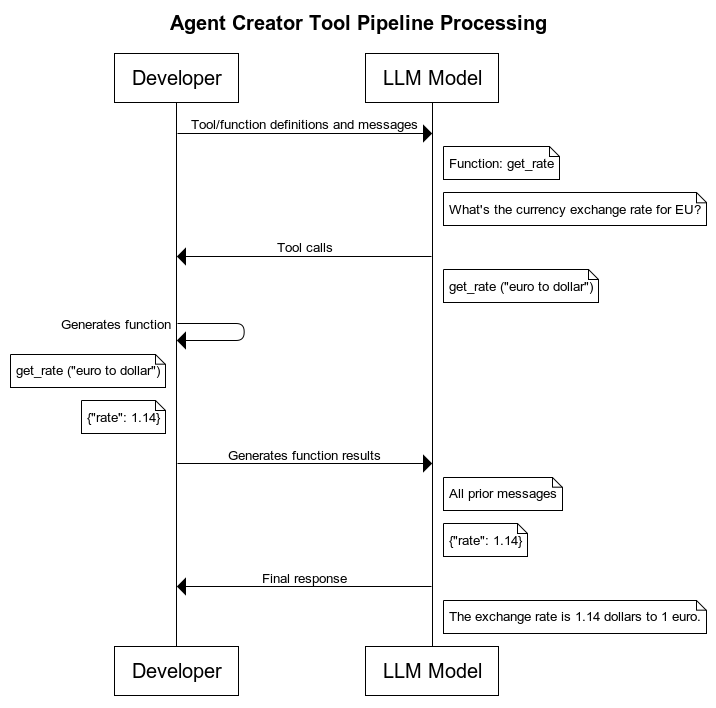
Tool pipelines must return a single output document per invocation. The Agent Snap expects a 1:1 mapping between a tool call and its result. If a tool pipeline returns multiple output documents, the Snap uses only the first and discards the rest, which may result in data loss. For pipelines that may produce multiple records — such as a database query — add a Gate Snap or similar aggregation logic to consolidate the output into a single document before the pipeline output view.
JSON mode
JSON mode is an advanced feature that instructs the model to return its output in JSON format. It is not required for all agents, but is useful when the agent needs to relay structured data to downstream systems.
Structured Outputs
Structured Outputs is an advanced feature that enforces a specific JSON schema on the model's response. Unlike JSON mode, which instructs the model to return valid JSON in any shape, Structured Outputs guarantees that the response conforms to a schema you define — ensuring downstream systems always receive data in the expected format. This is useful when agents need to produce output that feeds directly into a system with strict data requirements. Structured Outputs is supported for Azure OpenAI and OpenAI models.
Extended Thinking
Thinking models are designed to reason through complex problems before generating a response. This reasoning happens in a dedicated thinking phase, separate from the model's final output, and produces more accurate results for multi-step problems, ambiguous requests, or tasks that require weighing multiple options. Amazon Bedrock supports extended thinking for Claude reasoning models, using a Budget Tokens setting to control how many tokens are allocated to the reasoning phase. Azure OpenAI and OpenAI support reasoning for o-series models through a Reasoning Effort setting (low, medium, or high) that lets you balance response quality against cost and latency.
Get started
To get started, refer to the following articles: