


Unique
Overview
You can use this Snap to eliminate duplicate documents in a document stream, such as duplicate rows in a CSV file. Learn more about deduplicating the records.
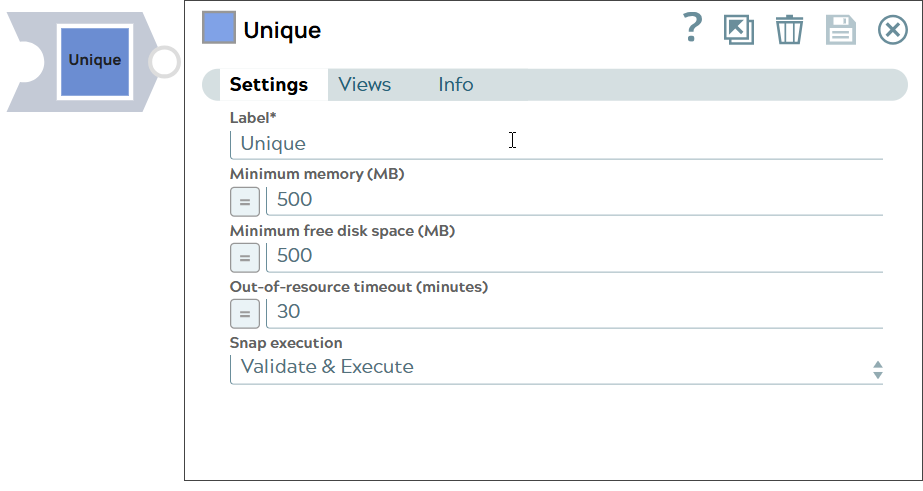
- This is a Transform-type Snap.
 Does not support Ultra Tasks
Limitations
Does not support Ultra tasks.
Snap views
| Type | Description | Examples of upstream and downstream Snaps |
|---|---|---|
| Input |
Any Reader Snap followed by any File Parser Snap. |
Document input, likely with duplicate data. |
| Output |
Any file Formatter Snap followed by a Writer Snap. |
Unique document data. |
| Learn more about Error handling. | ||
Snap settings
Legend:
- Expression icon (
 ): Allows using
pipeline parameters to set field values dynamically (if enabled). SnapLogic Expressions
are not supported. If disabled, you can provide a static value.
): Allows using
pipeline parameters to set field values dynamically (if enabled). SnapLogic Expressions
are not supported. If disabled, you can provide a static value. - SnapGPT (
 ): Generates SnapLogic Expressions
based on natural language using SnapGPT. Learn
more.
): Generates SnapLogic Expressions
based on natural language using SnapGPT. Learn
more. - Suggestion icon (
 ): Populates a
list of values dynamically based on your Snap configuration. You can select only one
attribute at a time using the icon. Type into the field if it supports a comma-separated
list of values.
): Populates a
list of values dynamically based on your Snap configuration. You can select only one
attribute at a time using the icon. Type into the field if it supports a comma-separated
list of values. - Upload
 : Uploads files. Learn more.
| Field/Field set | Type | Description |
|---|---|---|
Label
|
String |
Required. Specify a unique name for the Snap. Modify this to be more appropriate, especially if more than one of the same Snaps is in the pipeline. Default value: Unique Example: Deduplicate Emp IDs |
| Minimum memory (MB) | String/Expression | If the available memory is less than this property value while processing
input documents, the Snap stops fetching the next input document until more memory
is available. This feature is disabled if this property value is 0. Default value: 500 Example: 750 |
| Minimum free disk space (MB) | String/Expression | If the free disk space is less than this property value, the Snap stops
processing input documents until more free disk space is available. This feature is
disabled if this property value is 0. Default value: 500 Example: 750 |
| Out-of-resource timeout (minutes) | String/Expression | If the Snap pauses longer than this property value while waiting for more
memory available, it throws an exception to prevent the system from running out of
memory or disk space. Default value: 30 Example: 20 |
| Snap execution
|
Dropdown list |
Choose one of the three modes in
which the Snap executes. Available options are:
Default value: Execute only Example: Validate & Execute |
Example
Remove duplicate records