


SOAP Execute
Overview
You can use this Snap to call SOAP web service endpoints using incoming data that processes the SOAP responses.
- This is a Write-type Snap.
 Works in Ultra Tasks
Snap views
| Type | Description | Examples of upstream and downstream Snaps |
|---|---|---|
| Input | This Snap has at most one document input view. Document that conforms to the input view schema of the Snap (the Target Schema column in Mapper or Structure Snap). |
|
| Output | This Snap has at most one document output view. Document which represents the SOAP response (an XML transformed into JSON). |
|
| Learn more about Error handling. | ||
Snap settings
- Expression icon (
 ): Allows using
pipeline parameters to set field values dynamically (if enabled). SnapLogic Expressions
are not supported. If disabled, you can provide a static value.
): Allows using
pipeline parameters to set field values dynamically (if enabled). SnapLogic Expressions
are not supported. If disabled, you can provide a static value. - SnapGPT (
 ): Generates SnapLogic Expressions
based on natural language using SnapGPT. Learn
more.
): Generates SnapLogic Expressions
based on natural language using SnapGPT. Learn
more. - Suggestion icon (
 ): Populates a
list of values dynamically based on your Snap configuration. You can select only one
attribute at a time using the icon. Type into the field if it supports a comma-separated
list of values.
): Populates a
list of values dynamically based on your Snap configuration. You can select only one
attribute at a time using the icon. Type into the field if it supports a comma-separated
list of values. - Upload
 : Uploads files. Learn more.
| Field/Field set | Type | Description |
|---|---|---|
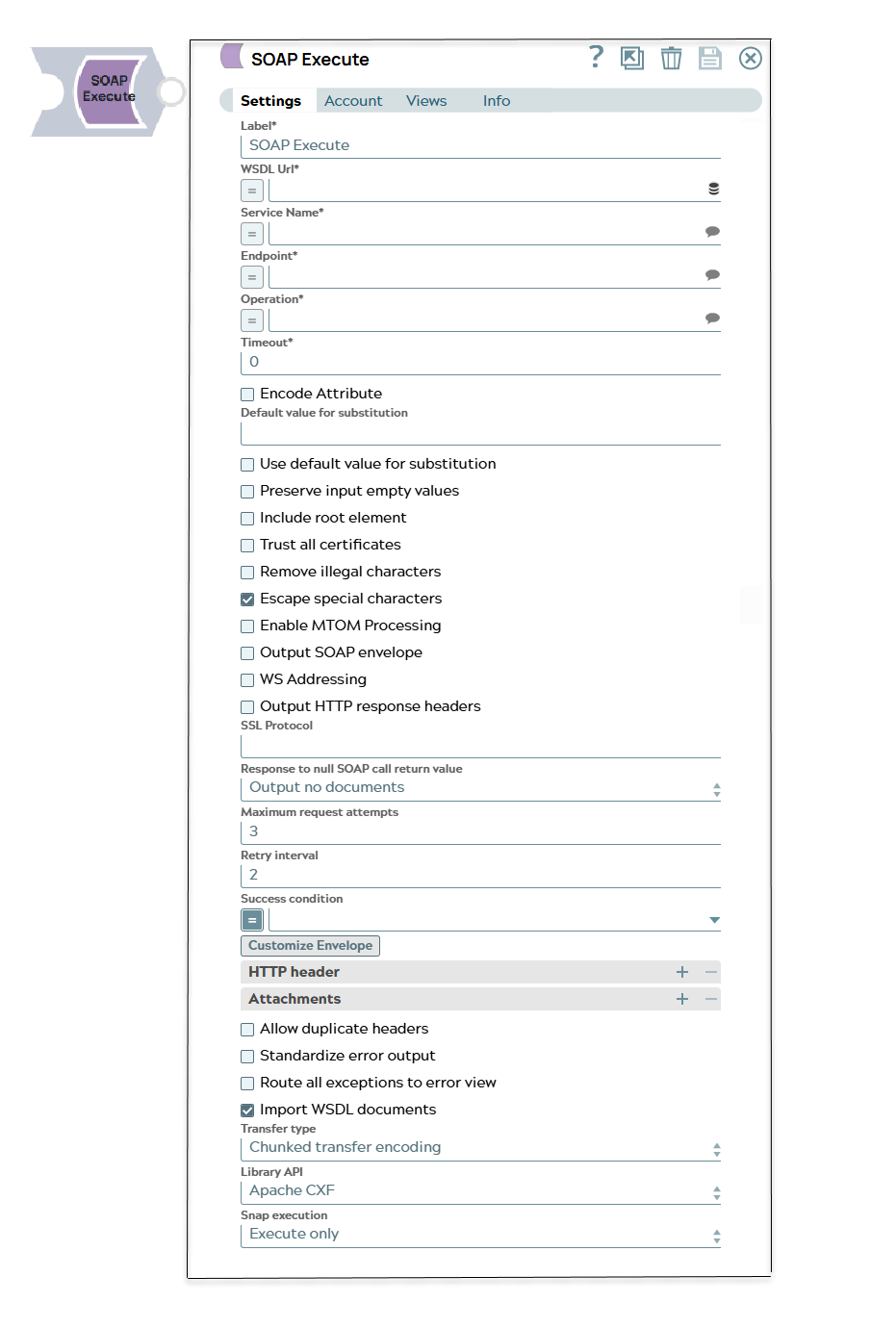
Label
|
String | Required. Specify a unique name for the Snap. Modify this to be more appropriate, especially if more than one of the same Snaps is in the pipeline. Default value: SOAP Execute Example: SOAP Execute |
| WSDL Url | String/Expression | Required. Specify the URL for the WSDL. Warning: WSDL File URL is case sensitive. Example: http://www.webservicex.net/stockquote.asmx?WSDL |
| Service Name | String/Expression/ Suggestion | Required. Specify the system function that has been
exposed to Web-based protocols. Example: http://www.webserviceX.NET/}StockQuote |
| Endpoint | String/Expression/ Suggestion | Required. Specify the endpoint (in WSDL 2.0
terminology)/Port name (in WSDL 1.1 terminology). Warning: Whenever
presented with multiple port versions, always select the latest one. Example: {http://www.webserviceX.NET/}StockQuote |
| Operation | String/Expression/ Suggestion | Required. Specify the operation to invoke. Example: GetQuote |
| Timeout | Integer | Required. Specify the timeout for the web service call
(in seconds). 0 indicates no timeout. Default value: 0 Example: 0 |
| Encode Attribute | Checkbox | Select this checkbox to differentiate the attributes from XSD with an '@'
prefix in the input schema and "at-" prefix in the template. Default status: Deselected |
| Default value for substitution | Integer | This value will be used for substitution for the leaf elements which are not objects and/or not enclosed in an array. If nothing is specified and Use default value for substitution is selected, an empty string will be used for substitution. |
| Use default value for substitution | Checkbox |
If you select this checkbox:
Default status: Deselected |
| Preserve input empty values | Checkbox | Select this checkbox to preserve any empty value within the input data in the
SOAP request. If you select Use default value for substitution checkbox, then
this field is ignored. Default status: Deselected |
| Include root element | Checkbox | Select this checkbox to include root element in the body or header in the keys
generated in the envelope template. Default status: Deselected |
| Trust all certificates | Checkbox | Select this checkbox to trust all certificates, such as self-signed
certificates. Default status: Deselected |
| Remove illegal characters | Checkbox | Select this checkbox to remove illegal UTF characters based on XML 1.0
standard. Default status: Deselected |
| Escape special characters | Checkbox | Select this checkbox to enable the Snap replace the XML
special characters in XML template variable values with the respective
character entity references (> <, and so on) while
inserting these values into the Apache Templates in Snaps. For example, the Snap
replaces < with <. Important: The special
characters that the Snap escapes are: >, <, &, ', " Default status: Selected |
| Enable MTOM Processing | Checkbox | Select this checkbox to enable content processing to multipart,
application/xop+xml type. Warning: When Message
Transmission Optimization Mechanism (MTOM) processing is enabled, binary
files will be transmitted outside the SOAP request envelope as a MIME attachment.
XML-binary Optimized Packaging (XOP) should then be used to reference
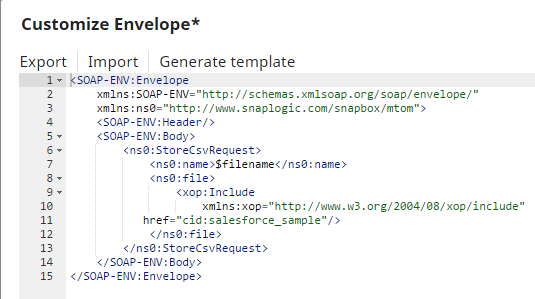
the attachment within the SOAP request envelope. The following example shows how contents of the file, salesforce_sample.csv, are inserted into the SOAP response and what updates are required to the Snap. After selecting
the Enable MTOM Processing field, the following updates to the Snap are
required for successful execution:
Note that to reference the attached file; you must specify the following line of code in the SOAP envelope: Default status: Deselected |
| Output SOAP envelope | Checkbox | Select this checkbox to output the whole SOAP envelope instead of just the SOAP
body. Default status: Deselected |
| WS Addressing | Checkbox | Creates and configures an addressing feature with the use of addressing
requirements. It enables WS-Addressing, that is it supports WS-Addressing but does
not require its use. It also configures to accept all the response types. Default status: Deselected |
| Output HTTP response headers | Checkbox | Select this checkbox to output the HTTP headers in the response. Default status: Deselected |
| SSL Protocol | String | Advance setting, leave blank to allow Java default. |
| Response to null SOAP call return value* | Dropdown list |
Specify an action to be taken when a SOAP call returns an empty response. The default action is Output no documents. You can handle SOAP call with an empty response in the following ways:
Default value: Output no documents Example: Output empty documents |
| Maximum request attempts | Integer | Specify the maximum number of attempts to be made to receive a SOAP response.
The SOAP request is terminated if the attempts do not result in a SOAP response. If
no value specified, only 1 attempt is made before terminating a SOAP request. Default value: 3 Example: 5 |
| Retry interval | Integer | Specify the interval between two successive SOAP requests. A retry happens only
when the previous attempt resulted in an exception. Default value: 2 Example: 5 |
| Success condition | Dropdown list/Expression | An expression to match success criteria in the SOAP response. Example: (with expression toggle on) $['SOAP-ENV:Body']['ns2:orderResponse']['ns2:result'] == "success" This would match the success criteria in this SOAP response: You can see that the user can find the SOAP output by setting Snap Execution on the SOAP Execute Snap, then seeing what comes out. You can also hook up a Mapper Snap and see the schema there. You can do that on the input view, but not the output view. |
| Customize envelope | Button | Launches the XML editor which will generate a SOAP envelope based on the
defined properties, WSDL URL, Service name, Port name and
Operation. The editor will load an envelope if it was defined previously.
The editor allows you to save SOAP envelopes in SnapLogic's file system or import
existing SOAP envelopes from it. The Apache Templates in Snaps can be used to pass
dynamic values from upstream Snaps. Any content that needs escaping from Velocity editor parsing can be enclosed with the following syntax:
See https://velocity.apache.org/engine/1.7/vtl-reference.html#unparsed-content for more information. |
| HTTP header | Use this field set to define HTTP header key-value
pairs. Warning: You must provide both key and value when invoking a
task. |
|
| Attachments | Use this field set to add attachments. | |
| Allow duplicate headers | Checkbox | Select this checkbox to allow duplicate headers value. If not selected, then
the last value of the duplicate header key is used. Default status: Deselected |
| Standardize error output | Checkbox | Select this checkbox to view the document in error view (a standardized error
document will show up in the error view)—error, reason, resolution, stack trace and
original. Default status: Deselected |
| Route all exceptions to error view | Checkbox | Select this checkbox to route the Snap exceptions generated by WSDL Url,
Service Name, Endpoint and Operation properties to the error
view and successfully execute the pipeline execution. Default status: Deselected |
| Import WSDL documents | Checkbox | Select this checkbox to import the external documents while reading the WSDL
file. The files that are declared with tag name wsdl:import & xs:import
are retrieved and processed. If this checkbox is not selected, then the external
documents that are required for WSDL are ignored. Default status: Selected |
| Transfer type | Dropdown list | The Snap uses each input document as a body of one SOAP request. There are two
ways of transferring the request body to the endpoint: 'Chunked transfer encoding'
or 'Calculate content length'. If 'Chunked transfer encoding' is selected and when
the message size is greater than 4KB, the SOAP request will be sent using chunked
transfer encoding. Otherwise, the request will not be chunked and the Content-Length
header will be included in the request. If a SOAP endpoint does not support 'Chunked transfer encoding', this property should be set to 'Calculate content length'. If the endpoint responds with an error of HTTP status code "411 Length Required", the Snap automatically retries the request with 'Calculate content length' mode. Default value: Chunked transfer encoding Example: Calculate content length |
| Library API | Dropdown list |
This property enables Snap execution over HTTP. Use the appropriate library to utilize the latest SOAP capabilities. The available options are:
Default value: Apache CXF Example: Apache HttpComponents |
| Snap execution
|
Dropdown list |
Choose one of the three modes in
which the Snap executes. Available options are:
Default value: Execute only Default value: Validate & Execute |

Managing Data Cache Duration
Whenever you provide resources, such as WSDLs and XSDs, in SOAP-based Snaps, SnapLogic caches the data for some time. The default cache duration is four hours. You can modify this to any positive number by updating the global properties for the Snaplex. See Configuration Options for information on defining the cache duration.