


Migrate a project to another Environment/Org
POST https://{controlplane_path}/api/1/rest/public/project/migrate/{project_path} Overview
This API migrates a SnapLogic Project from one Environment/Org to another.
If the destination project does not exist, it will be created.
Prerequisites
- Read access to the source project
- Write access to the target Environment/Org
Request
POST https://{controlplane_path}/api/1/rest/public/project/migrate/{project_path}
Path parameters
| Key | Description |
|---|---|
controlplane_path |
Required. The path to the SnapLogic control plane:
elastic.snaplogic.com
For the UAT or EMEA control plane, substitute the name for elastic. For
example:
|
project_path |
Required. The path of the source SnapLogic project.
Format:
Important: The path comparison is case-sensitive.
|
Query parameters
None.
Request header
Basic authentication
To use basic authentication, specify Basic for authorization in the request
header, add your credentials (email and password for your SnapLogic user or service account), and
specify application/json for content type. For example:
Authorization: Basic {base64_encoded <email>:<password>}
Content-Type: application/json
Example of basic authentication using Postman:
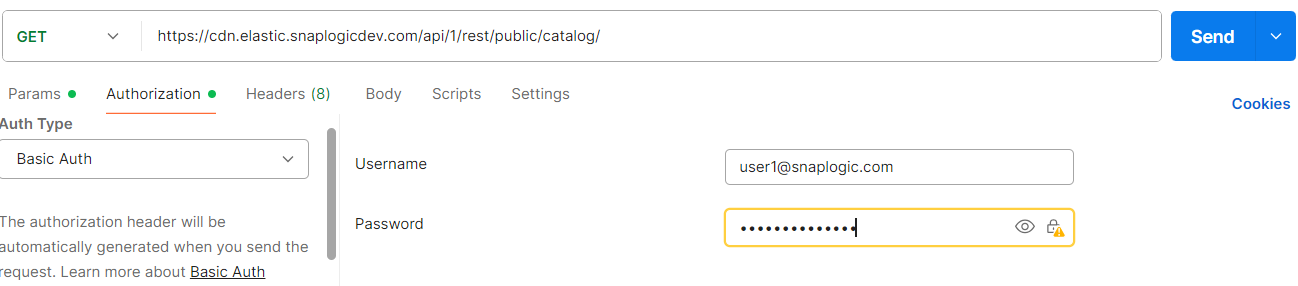
Learn more about the basic authentication header in REST API requests.
JWT authentication
When using JWT authentication, the API request includes specific headers. In the request header,
specify Bearer Token for authorization, add the token, and specify
application/json for content type. These headers are automatically added when
you configure bearer token authentication in your API client. The authorization header contains
the word Bearer followed by a space and your JWT.
Authorization: Bearer Token {token}
Content-Type: application/json
Example of JWT authentication using Postman:
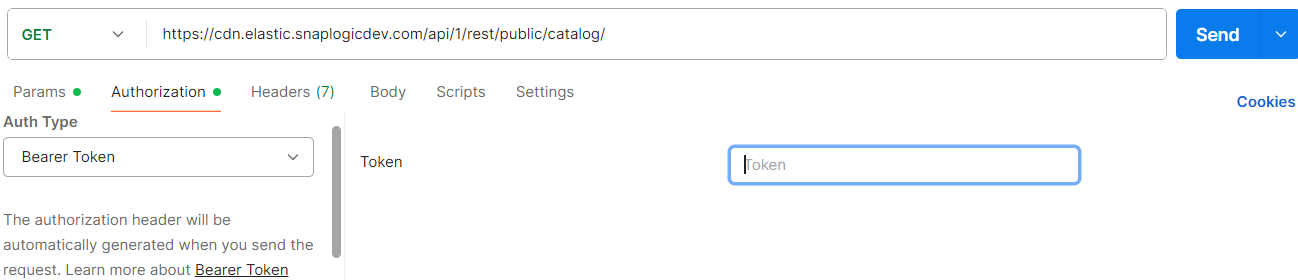
Request body
 {
  "dest_path" : "...",
  "asset_types" : [ ... ],
  "duplicate_check" : true,
  "async" : true
}
| Key | Type | Description |
|---|---|---|
dest_path |
string | Required. The path to the destination Project. |
asset_types |
array | The list of asset types to migrate. Valid values:
Important:
If you are migrating or copying accounts or policies to
a different environment (Org):
|
duplicate_check |
Boolean |
If If Default:
|
async |
Boolean | If true, the migration
proceeds asynchronously. A response is immediately returned with
Default:
|
Response
When async is set to true, the API returns immediately with a status token and URL to check the migration status:
{
    "response_map": {
        "status_token": "a8f70684-f422-42ed-83d1-78fa3aa1759a",
        "status_url": "https://elastic.snaplogic.com/api/1/rest/public/project/migrate/a8f70684-f422-42ed-83d1-78fa3aa1759a"
    },
    "http_status_code": 200
}
Use the status_url to poll for the migration status. The status response includes details about the migration progress and results:
{
    "response_map": {
        "status_token": "a8f70684-f422-42ed-83d1-78fa3aa1759a",
        "status": "Completed",
        "user_id": "user@snaplogic.com",
        "src_path": "/sourceorg/projects/myproject",
        "dest_path": "/destorg/projects/myproject",
        "create_time": "2024-12-23T18:37:46.249Z",
        "asset_types": [
            "File",
            "Job",
            "Account",
            "Pipeline"
        ],
        "successful": [
            {
                "snode_id": "58d172f773fe032daac6350c",
                "name": "rest_account"
            },
            {
                "snode_id": "58d172fa73fe032daac63510",
                "name": "import_pipe"
            }
        ],
        "failed": [
            {
                "reason": "HTTP Code: 401 Status: UNAUTHORIZED",
                "snode_id": "58d172aa411a3e956a84876a",
                "name": "secure_pipeline",
                "status_code": 401
            }
        ],
        "warnings": []
    },
    "http_status_code": 200
}
Response fields
| Key | Type | Description |
|---|---|---|
status_token |
string | The unique token for tracking the migration status. Returned when async is set to true. |
status_url |
string | The URL to poll for migration status. Use this URL to retrieve the status document. Returned when async is set to true. |
status |
string | The current status of the migration. Valid values:
|
user_id |
string | The user who initiated the migration. |
src_path |
string | The source project path from which assets were migrated. |
dest_path |
string | The destination project path to which assets were migrated. |
create_time |
string | The timestamp when the migration was initiated. |
asset_types |
array | The list of asset types included in the migration (File, Job, Account, Pipeline). |
successful |
array | An array of objects that contain:
|
failed |
array | An array of objects that contain:
|
warnings |
array | An array of objects that contain:
|
Notes
Project Migration Guidelines
- The first migration to the destination Environment/Org creates a new Project if there is no conflict. However, the existing Project is overwritten if there is a conflict.
- When you include previously migrated accounts and Tasks in subsequent migrations, the API overwrites any changes that you may have manually made to the assets after the initial migration.
- If the account name is changed after the migration, you must update all references to that account in the Pipelines.
- Every time you migrate a Project, SnapLogic retains existing associations between Pipelines and Tasks if the associated Tasks are included in the migration.