


Best Practices for Ultra Tasks
Managing Ultra Task Performance
Ultra Task performance depends on the response times of connected endpoints. High-latency Snap endpoints in the associated pipeline can cause document congestion that backs up to the FeedMaster queue. To prevent queue overflows, consider the following strategies:
- Increase Concurrency: Create multiple Ultra Task instances. This ensures that if one instance stalls, others can continue consuming documents.
- Manage Flow Control: Use the Max In-Flight setting on the Task form to regulate the number of documents processed simultaneously.
- Implement Internal Routing: At the pipeline level, you can use a Router Snap to distribute documents across multiple endpoint Snaps. This increases parallel processing within a single instance, complementing the pipeline’s ability to process multiple documents at once.
Scaling
You can achieve Ultra Task scaling by increasing the instance count of an Ultra Task. The number of instances required depends on the expected response time, the resource utilization of a single task instance, and the load on the Snaplex from other pipelines. When execution nodes are highly utilized, adding more allows the instances of the Task to be distributed horizontally and scaled out across the Snaplex. We recommend testing your Ultra Tasks during development to determine the optimal settings.
High Availability Architecture
To avoid service disruption and enable high availability, use a load balancer with two FeedMaster nodes and two execution nodes as the minimum architecture for Ultra Task setup. This architecture also avoids a single point of failure from the FeedMaster or execution node.
Monitoring Ultra Tasks
For information about monitoring Ultra Tasks in SnapLogic Monitor, refer to Monitor Ultra Tasks.
Document lineage hierarchy
The original document is needed so that lineage can be maintained. Every incoming document in an Ultra Task must maintain Snap lineage across the pipeline. This operation allows the FeedMaster node to use the correlation ID to tie the request to the response. To maintain the lineage and identity of a static web service or file, use a Join Snap with a static key to link the static information to each request document. The following example pipeline demonstrates the usage of a Join Snap with a static configuration file for parameter mapping.
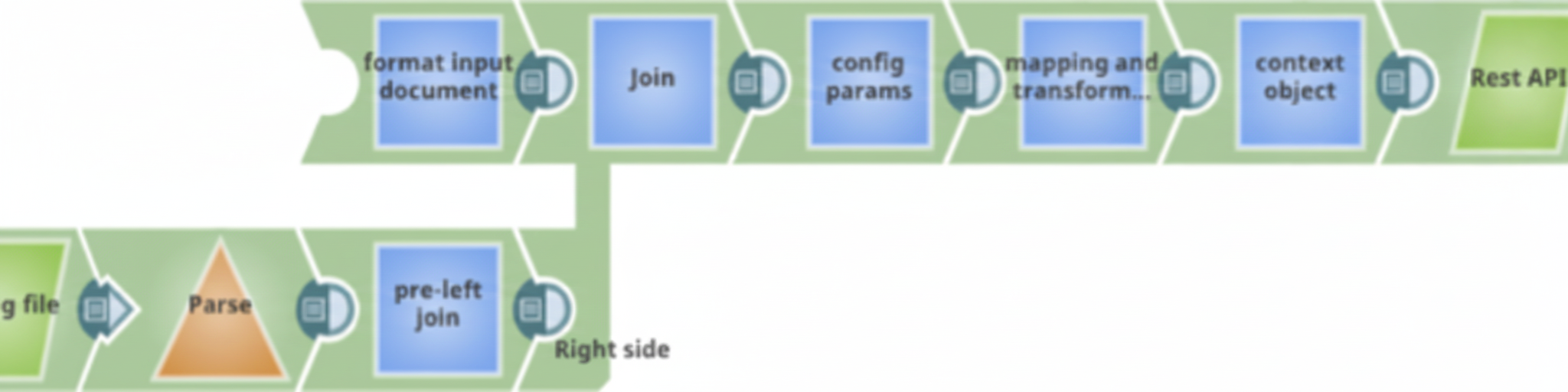
Child Pipelines in Ultra Tasks
You can call child pipelines through Ultra Tasks by using the Pipeline Execute Snap with Reuse enabled and a Pool Size greater than one. However, you should apply error handling to child pipelines so that errors occurring in any Snaps can be returned to the parent pipeline. You can add error views to the crucial Snaps in the parent pipeline, then introduce the error views to the HTTP Client Snap calling the child pipeline. Refer to Troubleshooting Ultra Pipelines.
Usage guidelines
- If a pipeline called by an Ultra Task has an unlinked input view, then the pipeline should also have one or more unlinked output views as well.
For Low-latency Ultra, the default behavior is that if the first run of an Ultra Task fails, SnapLogic attempts to run it for a total of five times. However, you can configure the number of times you want Ultra Tasks to run by configuring the maximum number of allowed retries for the pipeline on the Snaplex.
To do so, modify the
ultra.max_redelivery_countparameter in Global Properties in Snaplex Update dialog to indicate the number of times you want a failed pipeline to run.Attention: Headless Ultra does not support this configuration setting.- The maximum payload per request for an Ultra Task is based on the following calculation: 60% of the Java Virtual Machine heap size divided by 16.
For example, if the JVM heap size is 10 GB, then the maximum size for the request payload is 375 MB per request
(0.6 * 10 GB / 16). - You cannot change pipeline parameters at run time. These parameters are specified in the pipeline itself or when the Ultra Task is created. They are set at pipeline startup, which only happens on initiation, not per document.
Snaps with limited support for Ultra Tasks
For a complete list of supporting Snaps and those with limitations, refer to Snap Support for Ultra Tasks.
- Snaps that wait until something is completed, such as Aggregate and Sort, should not be used in pipelines invoked by Ultra Tasks.
- DB Snaps that write to the database must have the batch size in the account set to one; otherwise, they do not see the effect of the writes.
- For the JSON Formatter Snap, select the Format each document option.
- For the XML Formatter Snap, clear the Root Element field.
- Script and Execute Script Snaps need to pass the original document to the
write()method for the output view. The following example shows the body of the loop in a JavaScript:// Read the next document, wrap it in a map and write out the wrapper var doc = this.input.next(); var wrapper = new java.util.HashMap(); wrapper.put("original", doc); this.output.write(wrapper);The last line should look like:
this.output.write(doc, wrapper);