


Generate Customer Insights Based on Transaction Data
This example demonstrates how to use the Feature Synthesis Snap to enrich a customer dataset by generating features from a related transaction dataset.
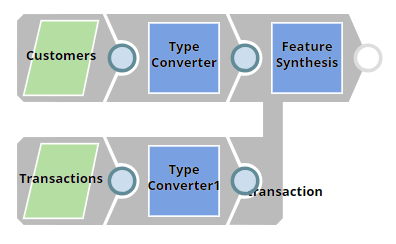
The pipeline combines customer and transaction datasets using the Feature Synthesis Snap. It automatically
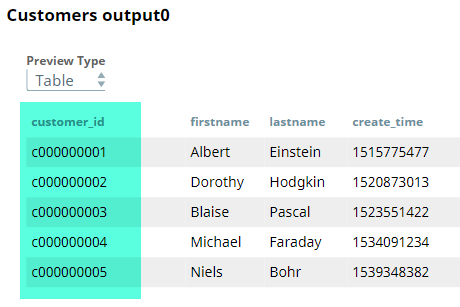
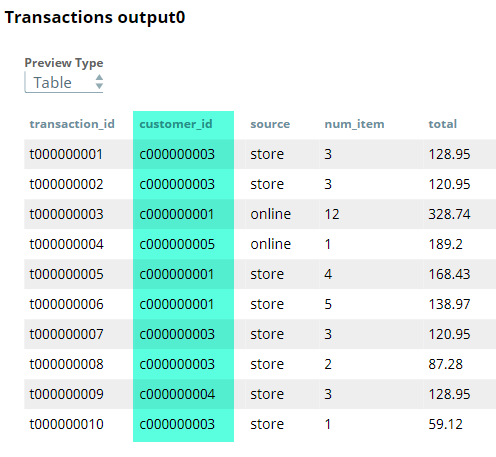
synthesizes features such as total purchase amount and item count per customer by joining on
the common $customer_id field.
-
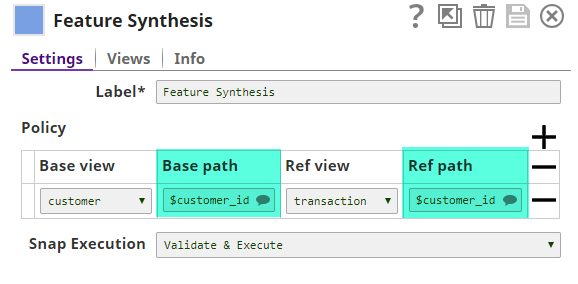
Configure the Feature Synthesis Snap
with the following settings:
- Base view:
customer - Reference view:
transaction - Join field:
$customer_id
The Snap identifies one-to-many relationships and synthesizes aggregated features from the transaction dataset per customer.
- Base view:
-
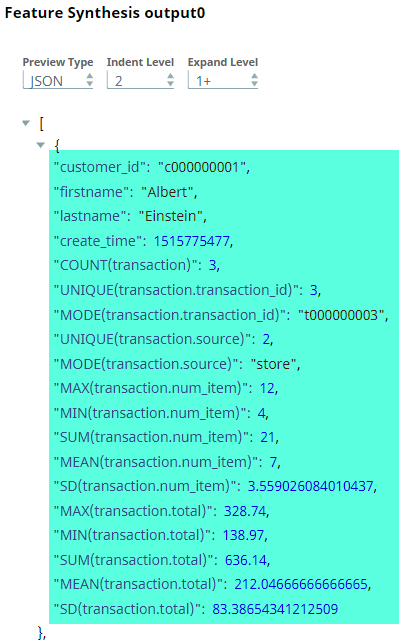
Review the output from the Feature Synthesis Snap.
The Snap appends new fields to each customer record, such as:
- Total number of transactions
- Sum of
$total - Average
$num_itemper transaction
A JSON-formatted preview is also available to inspect the complete feature set per customer.
- Download and import the SLP file into your Environment.
- Configure Snap accounts.
- Provide Pipeline parameters, if any.