


REST Dynamic OAuth2 Account
Overview
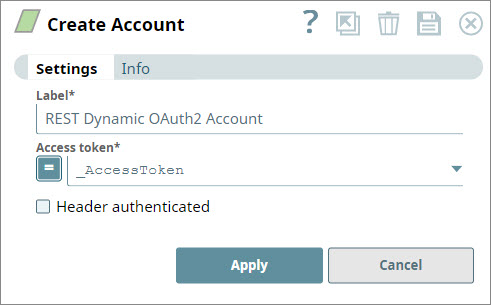
You can use this account type to select dynamic values to connect to data sources that use REST OAuth2 accounts.
Prerequisites
- Valid Access token.
Account settings
- Expression icon (
 ): Allows using
JavaScript syntax to access SnapLogic Expressions to set field values dynamically (if
enabled). If disabled, you can provide a static value. Learn more.
): Allows using
JavaScript syntax to access SnapLogic Expressions to set field values dynamically (if
enabled). If disabled, you can provide a static value. Learn more. - SnapGPT (
 ): Generates SnapLogic Expressions
based on natural language using SnapGPT. Learn
more.
): Generates SnapLogic Expressions
based on natural language using SnapGPT. Learn
more. - Suggestion icon (
 ): Populates a
list of values dynamically based on your Snap configuration. You can select only one
attribute at a time using the icon. Type into the field if it supports a comma-separated
list of values.
): Populates a
list of values dynamically based on your Snap configuration. You can select only one
attribute at a time using the icon. Type into the field if it supports a comma-separated
list of values. - Upload
 : Uploads files. Learn more.
| Field/Field set | Type | Description |
|---|---|---|
| Label | String |
Required. Specify the name for the account.
We recommend that you update the account name if there is more than one account of the same account type in your project.
Default value: N/A Example: REST Dynamic OAuth2 Account |
| Access token | String/Expression |
Required.
Specify the access token for the application. The retrieval of the access token is done when setting up the account for the endpoint. Note:
This property is expression-enabled. For more information on the expression language, see Understanding Expressions in SnapLogic and Using Expressions. For information on Pipeline Parameters, see Pipeline Properties. Note: By default, we make the request using bearer <access
token> (lower case bearer). Some endpoints require Bearer to be
capitalized. For such endpoints, you can fully qualify the
access token property by defining it as: Bearer <access
token>. Default value: N/A Example: _AccessToken |
| Header authenticated | Checkbox |
Select this checkbox to indicate if the endpoint uses bearer header authentication.
Default value: Deselected |
Troubleshooting
One or more required field is blank.
- Label
- Access token
- Label
- Access token