


Selecting a Subset of Data from an Amazon S3 Object (JSON file)
This example Pipeline demonstrates how to use the Amazon S3 Select Snap to select a subset of data from a JSON file.

Prerequisites
A valid AWS S3 Account
In this example we take a JSON file and use S3 Select to select a subset of the data (in this case, employees from the Sales department).
Overview of steps:
-
Upload a single JSON file to the S3 object using the JSON Generator Snap.
-
Format the file using the JSON Formatter Snap.
-
Upload the file using the S3 Upload Snap.
-
Select a subset of the data using the S3 Select Snap.
-
Use the JSON Parser Snap to read the JSON binary data from its input view, parse it, and then write it to its output view.
-
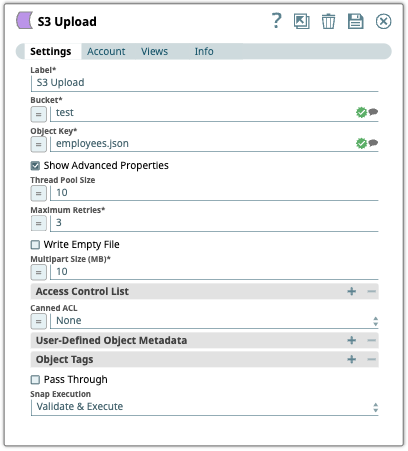
Configure the
S3 Upload
Snap to upload the S3
object (employees.json) to the S3 object bucket.
-
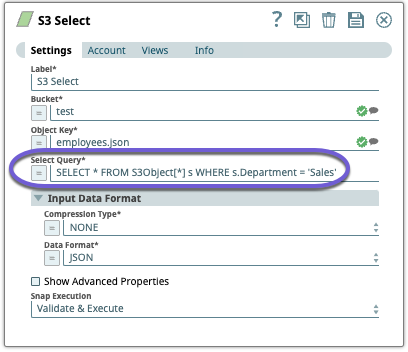
Configure the
S3 Select
Snap to select a
subset of the data from the S3 object (in this case, we are selecting employees from the
Sales department). On validation, the Snap retrieves the data based on the SELECT
statement.
-
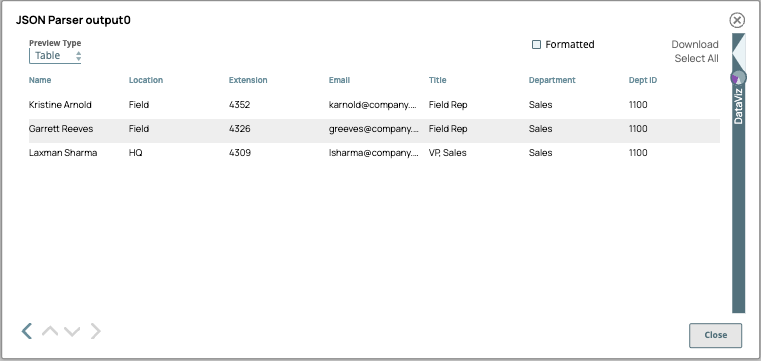
Use the JSON Parser Snap to read the JSON
binary data from its input view, parse it, and then write it to its output view. The
output shows the list of employees from the Sales department.
- Download and import the pipeline into SnapLogic.
- Configure Snap accounts as applicable.
- Provide pipeline parameters as applicable.