


Kafka Account
Overview
You can use the Kafka account type to connect Confluent Kafka Snaps with data sources that use Kafka accounts.
Account settings
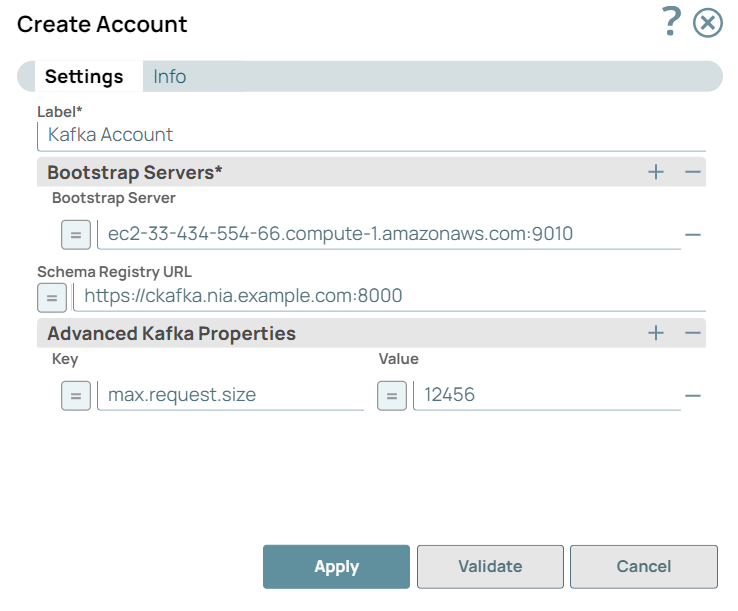
Legend:
- Expression icon (
 ): Allows using
JavaScript syntax to access SnapLogic Expressions to set field values dynamically (if
enabled). If disabled, you can provide a static value. Learn more.
): Allows using
JavaScript syntax to access SnapLogic Expressions to set field values dynamically (if
enabled). If disabled, you can provide a static value. Learn more. - SnapGPT (
 ): Generates SnapLogic Expressions
based on natural language using SnapGPT. Learn
more.
): Generates SnapLogic Expressions
based on natural language using SnapGPT. Learn
more. - Suggestion icon (
 ): Populates a
list of values dynamically based on your Snap configuration. You can select only one
attribute at a time using the icon. Type into the field if it supports a comma-separated
list of values.
): Populates a
list of values dynamically based on your Snap configuration. You can select only one
attribute at a time using the icon. Type into the field if it supports a comma-separated
list of values. - Upload
 : Uploads files. Learn more.
| Field/Field set | Type | Description |
|---|---|---|
| Label | String |
Required. Specify a unique label for the
account. Default value: N/A Example: Kafka Account |
| Bootstrap servers | Use this field set to
configure a list of bootstrap servers. Click the add icon (  ) to add a new row in this table
for configuring bootstrap servers. ) to add a new row in this table
for configuring bootstrap servers. This field set contains the Bootstrap Server field. |
|
| Bootstrap Server | String/Expression | Specify the host:port pair to establish the initial connection
to the Kafka cluster. Default value: N/A Example: ec2-55-334-24-55.compute-1.amazonaws.com:9000 |
| Schema registry URL | String/Expression | Specify the schema registry server URL. Default value: N/A Example: http://ec2-55-334-24-55.compute-1.amazonaws.com:8000 |
| Advanced Kafka Properties | Use this field set to
specify any additional Kafka properties for connecting to the Kafka
server that are not explicitly provided in the Kafka Snaps. Note: These properties are passed directly to the server and
have not been tested by SnapLogic, Inc.
This field set contains the following fields:
|
|
| Key | String/Expression | Specify the key for any Kafka parameters that are not explicitly
supported by the Snaps. Default value: N/A Example: max.request.size |
| Value | String/Expression | Specify the value for the corresponding key that is not
explicitly supported by the Snaps. Default value: N/A Example: 500 |