


SOAP SSL Account
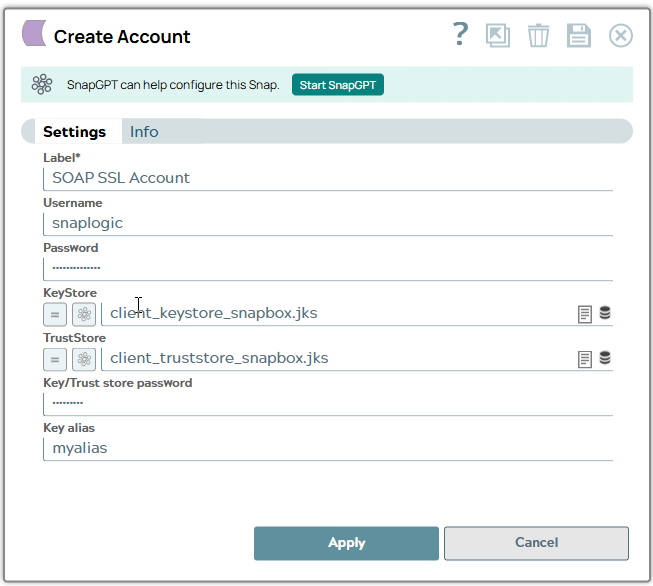
Account settings
Legend:
- Expression icon (
 ): Allows using
JavaScript syntax to access SnapLogic Expressions to set field values dynamically (if
enabled). If disabled, you can provide a static value. Learn more.
): Allows using
JavaScript syntax to access SnapLogic Expressions to set field values dynamically (if
enabled). If disabled, you can provide a static value. Learn more. - SnapGPT (
 ): Generates SnapLogic Expressions
based on natural language using SnapGPT. Learn
more.
): Generates SnapLogic Expressions
based on natural language using SnapGPT. Learn
more. - Suggestion icon (
 ): Populates a
list of values dynamically based on your Snap configuration. You can select only one
attribute at a time using the icon. Type into the field if it supports a comma-separated
list of values.
): Populates a
list of values dynamically based on your Snap configuration. You can select only one
attribute at a time using the icon. Type into the field if it supports a comma-separated
list of values. - Upload
 : Uploads files. Learn more.
| Field/Field set | Type | Description |
|---|---|---|
| Label
|
String |
Required.Specify a unique label for the account. Default value: None. |
| Username | String/Expression |
Required. The name for this account. Default value: None. |
| Password | String |
Required. The password for the account. Default value: None. |
| Keystore | String/Expression | The location of the keystore file can be in SLDB or any other unauthenticated endpoint such as https:// |
| TrustStore | String/Expression |
The location of the truststore file can be in SLDB or any other unauthenticated endpoint such as https:// Default value: None. |
| Key/Trust store password | String | Required. Password for the key/trust
store. It is used for both if both are defined. Default value: None. |
| Key alias | String | Required. Lets you define the key being
used by its alias. Default value: None. |
Account encryption
| Standard Encryption | If you are using Standard Encryption, the High sensitivity settings under Enhanced Encryption are followed. |
| Enhanced Encryption | If you have the Enhanced Account Encryption feature, the
following describes which fields are encrypted for each
sensitivity level selected for this account:
|