


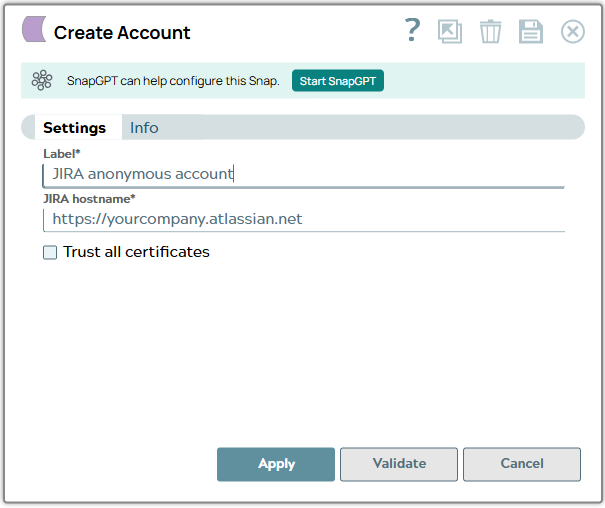
Anonymous Account
Overview
You can use this account type to connect the JIRA Snaps with data sources that use
the Anonymous account.
Note: For this Account to work, you must configure your JIRA
instance to allow users anonymous access for the operations that you want to
enable. For details on managing access, see How to allow users to create issues
anonymously. You will also need to allow anonymous access to the
concerned project. For details on doing so, see Managing project
permissions.
Account settings
Legend:
- Expression icon (
 ): Allows using
JavaScript syntax to access SnapLogic Expressions to set field values dynamically (if
enabled). If disabled, you can provide a static value. Learn more.
): Allows using
JavaScript syntax to access SnapLogic Expressions to set field values dynamically (if
enabled). If disabled, you can provide a static value. Learn more. - SnapGPT (
 ): Generates SnapLogic Expressions
based on natural language using SnapGPT. Learn
more.
): Generates SnapLogic Expressions
based on natural language using SnapGPT. Learn
more. - Suggestion icon (
 ): Populates a
list of values dynamically based on your Snap configuration. You can select only one
attribute at a time using the icon. Type into the field if it supports a comma-separated
list of values.
): Populates a
list of values dynamically based on your Snap configuration. You can select only one
attribute at a time using the icon. Type into the field if it supports a comma-separated
list of values. - Upload
 : Uploads files. Learn more.
| Field/Field set | Type | Description |
|---|---|---|
| Label
|
Required. Specify a unique label for the account. Default value: N/A Example: Anonymous Account |
|
| JIRA Hostname
|
Required.
Specify the hostname for the JIRA REST API service in the format of
"https://hostname/". Default value: N/A Example: https://jira.atlassian.com |
|
| Trust all certificates
|
Trust all certificates, such as
self-signed certificates.. Default value: N/A |
|