


JIRA OAuth2 Account
Overview
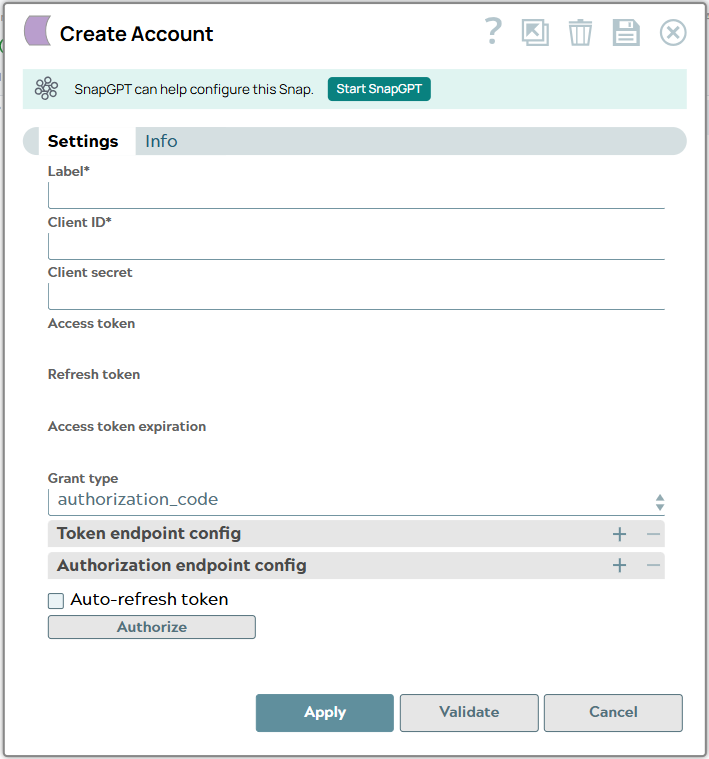
Prerequisites
- Valid OAuth2 scopes configured
- Proper credentials established
- Appropriate permissions granted
Account settings
- Expression icon (
 ): Allows using
JavaScript syntax to access SnapLogic Expressions to set field values dynamically (if
enabled). If disabled, you can provide a static value. Learn more.
): Allows using
JavaScript syntax to access SnapLogic Expressions to set field values dynamically (if
enabled). If disabled, you can provide a static value. Learn more. - SnapGPT (
 ): Generates SnapLogic Expressions
based on natural language using SnapGPT. Learn
more.
): Generates SnapLogic Expressions
based on natural language using SnapGPT. Learn
more. - Suggestion icon (
 ): Populates a
list of values dynamically based on your Snap configuration. You can select only one
attribute at a time using the icon. Type into the field if it supports a comma-separated
list of values.
): Populates a
list of values dynamically based on your Snap configuration. You can select only one
attribute at a time using the icon. Type into the field if it supports a comma-separated
list of values. - Upload
 : Uploads files. Learn more.
| Field/Field set | Type | Description |
|---|---|---|
| Label
|
Required.
Specify a unique label for the account. Default value: JIRA OAuth2 Account Example: JIRA OAuth2 Account |
|
| Client ID
|
Required.
Specify the OAuth2 client identifier created through your
application provider. Default value: N/A Example: your_client_id |
|
| Client Secret
|
Required.
Specify the secure secret associated with your client ID. Default value: N/A Example: Encrypted |
|
| Access Token
|
This field is auto-generated after
authorization. The token enables API requests on the user's behalf.
Default value: Auto-generated |
|
| Refresh Token
|
This field is auto-generated after
authorization. The token allows automatic access token renewal
before expiration. Default value: Auto-generated |
|
| Access Token Expiration
|
This field is auto-generated after
authorization. Specifies the token validity duration in seconds.
Default value: Auto-generated |
|
| Grant Type
|
Required.
Select the OAuth2 grant type. Choose between:
Default value: authorization_code |
|
| OAuth2 Endpoint
|
Required.
Specify the authorization endpoint URL. Default value: N/A Example: https://auth.atlassian.com/authorize |
|
| OAuth2 Token
|
Required.
Specify the token retrieval endpoint URL. Default value: N/A Example: https://auth.atlassian.com/oauth/token |
|
| Token Endpoint Config
|
Specify custom OAuth2 token
properties as parameter name and value pairs. Default value: None |
|
| Auth Endpoint Config
|
Specify custom authentication
properties as parameter name and value pairs. Default value: None |
|
| Auto-refresh Token
|
Select this checkbox to enable
automatic token refresh before expiration. Learn more about how the
SnapLogic Platform handles token refresh failures. Default value: Selected |
|