Snowflake Metadata Caching
Configure Snowflake metadata caching in your Snaplex by setting global JVM properties to control cache status, size, and expiration for Snowflake pipelines.
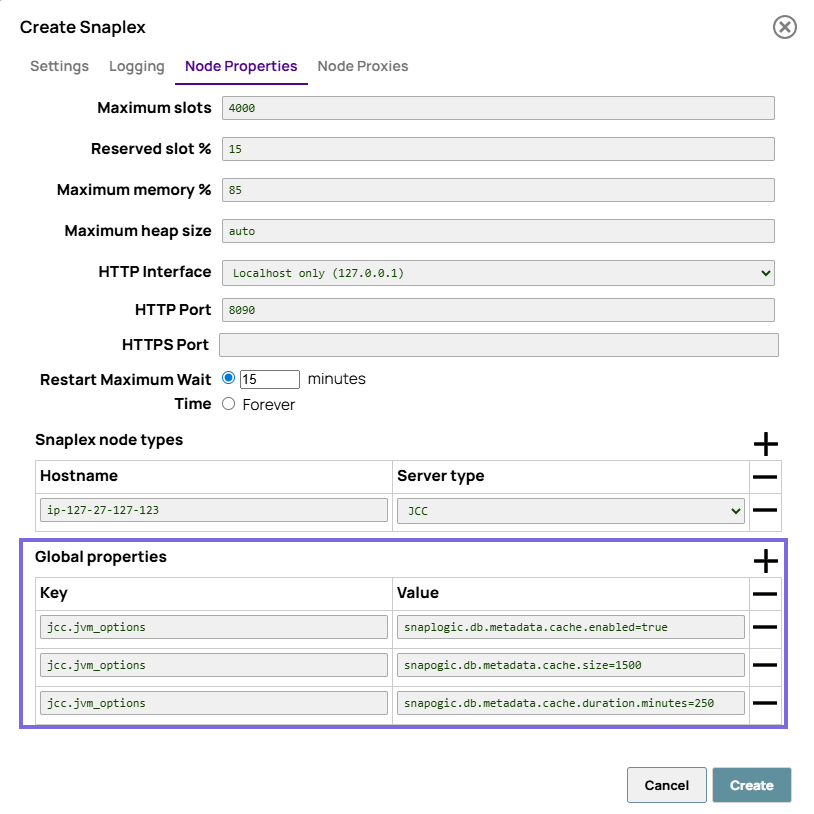
You can configure global cache properties for Snowflake metadata in your Snaplex. To set these values:
-
Click Node Properties and, at the bottom of the tab that appears, set the
Global properties. You can configure cache properties
in your Snaplex for Snowflake pipelines using the following JVM
properties:
Cache property JVM option Cache status: Set this value to true to enable caching. snaplogic.db.metadata.cache.enabledDefault value: false
Example:
snaplogic.db.metadata.cache.enabled=trueCache size: Maximum entries in cache mode. Entry refers to complete schema information. snaplogic.db.metadata.cache.sizeDefault value: 1000
Example:
snaplogic.db.metadata.cache.size=1500Cache expiration duration: Expiration duration (minutes). snaplogic.db.metadata.cache.duration.minutesDefault value: 120
Example:
snaplogic.db.metadata.cache.duration.minutes=250