


OPC UA Node Selector
Overview
You can use this Snap to select multiple Node IDs. It supports up to ten Node IDs. Learn how to select multiple nodes using this Snap.
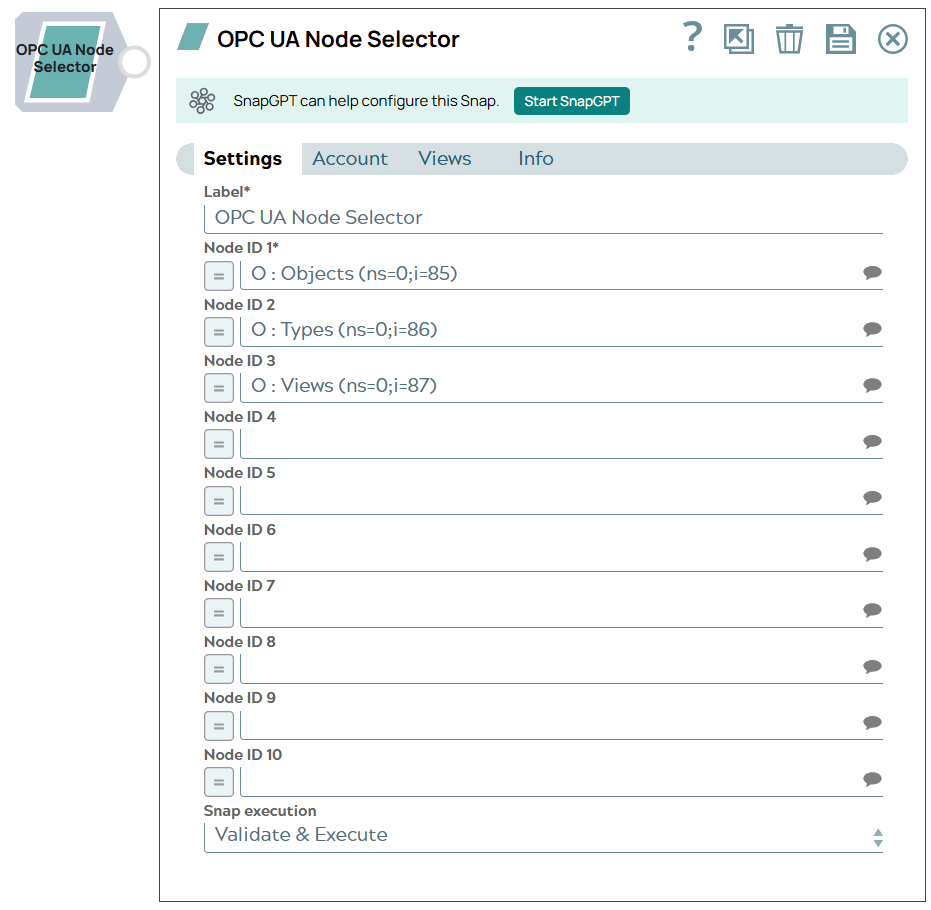
- This is a Read-type Snap.
 Works in Ultra Tasks
Prerequisites
A valid OPC UA Account.
Snap views
| Type | Description | Examples of upstream and downstream Snaps |
|---|---|---|
| Input | Upstream Snaps are not supported because the Input view is not available for this Snap. | |
| Output | The OPC UA Node Selector Snap typically outputs documents containing Node ID (the unique identifier for each selected node). | |
| Learn more about Error handling. | ||
Snap settings
- Expression icon (
 ): Allows using
JavaScript syntax to access SnapLogic Expressions to set field values dynamically (if
enabled). If disabled, you can provide a static value. Learn more.
): Allows using
JavaScript syntax to access SnapLogic Expressions to set field values dynamically (if
enabled). If disabled, you can provide a static value. Learn more. - SnapGPT (
 ): Generates SnapLogic Expressions
based on natural language using SnapGPT. Learn
more.
): Generates SnapLogic Expressions
based on natural language using SnapGPT. Learn
more. - Suggestion icon (
 ): Populates a
list of values dynamically based on your Snap configuration. You can select only one
attribute at a time using the icon. Type into the field if it supports a comma-separated
list of values.
): Populates a
list of values dynamically based on your Snap configuration. You can select only one
attribute at a time using the icon. Type into the field if it supports a comma-separated
list of values. - Upload
 : Uploads files. Learn more.
| Field/Field set | Type | Description |
|---|---|---|
Label
|
String | Required. Specify a unique name for the Snap. Modify this to be more appropriate, especially if more than one of the same Snaps is in the pipeline. Default value: Node Selector Example: Node Selector |
| Node ID 1 | String/Expression/ Suggestion | Required. Specify a Node ID or choose one from the suggestions. Learn more about Node suggestions. Default value: N/A Example: O : Objects (ns=0;i=85) |
| Node ID 2 | String/Expression/ Suggestion | Required. Specify a Node ID or choose one from the suggestions. Default value: N/A Example: O : Objects (ns=0;i=85) |
| Node ID 3 | String/Expression/ Suggestion | Required. Specify a Node ID or choose one from the suggestions. Default value: N/A Example: O : Objects (ns=0;i=85) |
| Node ID 4 | String/Expression/ Suggestion | Required. Specify a Node ID or choose one from the suggestions. Default value: N/A Example: O : Objects (ns=0;i=85) |
| Node ID 5 | String/Expression/ Suggestion | Required. Specify a Node ID or choose one from the suggestions. Default value: N/A Example: O : Objects (ns=0;i=85) |
| Node ID 6 | String/Expression/ Suggestion | Required. Specify a Node ID or choose one from the suggestions. Default value: N/A Example: O : Objects (ns=0;i=85) |
| Node ID 7 | String/Expression/ Suggestion | Required. Specify a Node ID or choose one from the suggestions. Default value: N/A Example: O : Objects (ns=0;i=85) |
| Node ID 8 | String/Expression/ Suggestion | Required. Specify a Node ID or choose one from the suggestions. Default value: N/A Example: O : Objects (ns=0;i=85) |
| Node ID 9 | String/Expression/ Suggestion | Required. Specify a Node ID or choose one from the suggestions. Default value: N/A Example: O : DeviceSet (ns=2;i=5001) |
| Snap execution
|
Dropdown list | Choose one of the three modes in
which the Snap executes. Available options are:
Default value: Validate & Execute Example: Execute only |
Node suggestions
-
Suggestions for the node are generated by traversing the OPC UA address space one step at a time.
-
The suggestion format is:
<Type Abbreviation> : <Display Name>
                (<NodeId>)
For example:
V : Temperature (ns=2;s=Temperature1) -
Abbreviations used for NodeClass:
-
O = Object
-
V = Variable
-
M = Method
-
OT = ObjectType
-
VT = VariableType
-
RT = ReferenceType
-
DT = DataType
-
VW = View
-
U = Unspecified
-
-
Navigation: You can iteratively traverse the address space by following these steps:
-
Select a suggestion.
-
Click Suggest again.
-
Fetch children of the selected node.
-