


Insert, Update, Delete, and Query a GraphQL Endpoint
Prerequisites
A valid account to access the resources from the endpoint.
The following example pipeline demonstrates how to use the GraphQL Client Snap to insert, update, delete, and query the schema provided by the server at the specified GraphQL endpoint.
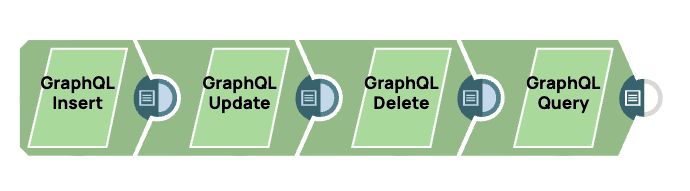
-
Specify the GraphQL endpoint and then enter a query or a mutation in the Query
text box. Alternatively, click the Query builder button to open a GUI query builder
that contains all the available objects and fields.
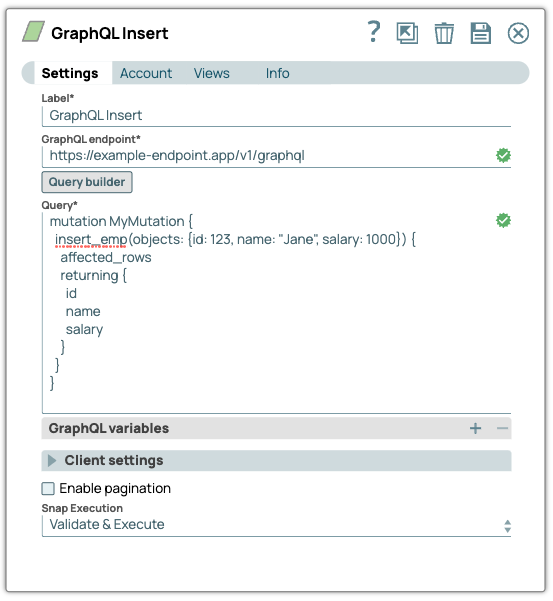
In this example, the following mutation operation inserts an employee record for Jane into the server data.
mutation MyMutation { insert_emp(objects: {id: 123, name: "Jane", salary: 1000}) { affected_rows returning { id name salary } } } -
Configure another
GraphQL Client
Snap to update the
employee record in the server data.

mutation MyMutation { update_emp(where: {id: {_eq: 123}}, _set: {name: "Janet"}) { affected_rows returning { id name salary } } } -
Configure another
GraphQL Client
Snap to delete the
employee record from the server data.
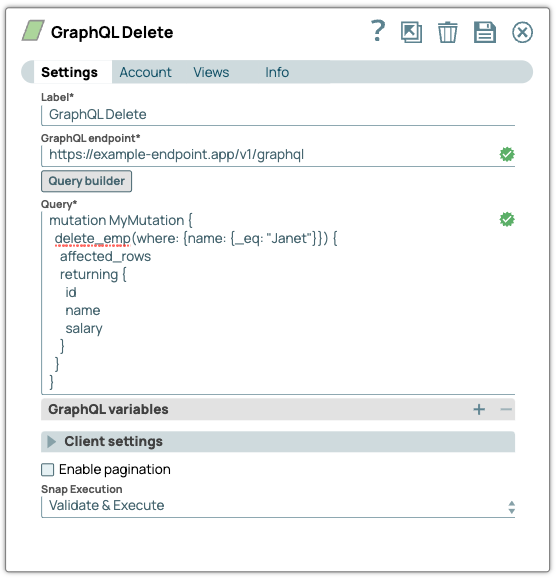
In this example, the following mutation operation deletes the employee record from the server data.
mutation MyMutation { delete_emp(where: {name: {_eq: "Janet"}}) { affected_rows returning { id name salary } } } -
Finally, configure a
GraphQL Client
Snap to query the
data for all the employee records on the server.
In this example, the following query retrieves all the employee records from the server.
query MyQuery {
 emp {
 id
 name
 salary
 }
}
- Download and import the pipeline into SnapLogic.
- Configure Snap accounts as applicable.
- Provide pipeline parameters as applicable.