


Multipart Writer
Overview
This Snap merges multiple binary documents into a single MIME "multipart" stream.
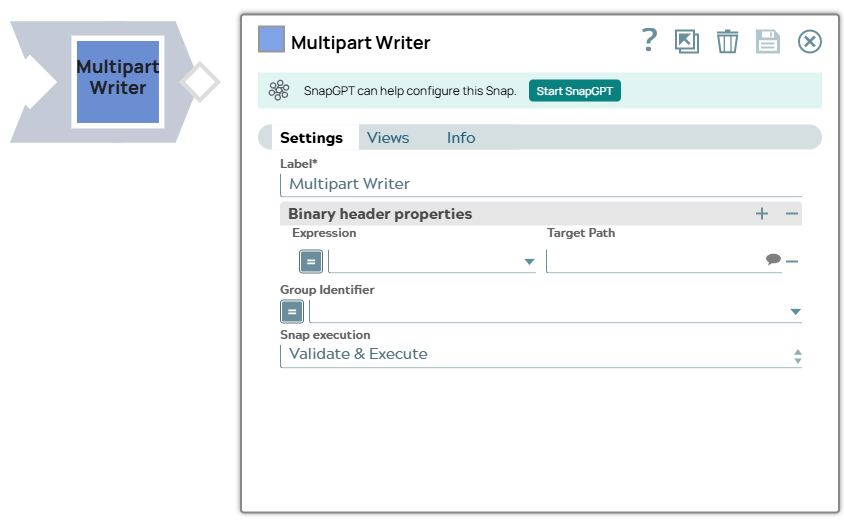
- This is a Transform-type Snap.
 Does not support Ultra Tasks
Known issues
-
The Snap creates a zero-byte file when writing a file to FTPS server (FileZilla) using TLS v1.3 for FTPS (explicit FTP over TLS) and FTPIS (implicit mode) modes. Note that this is an intermittent issue. By default, the Snap uses TLS v1.3.
Workaround: To prevent the Snap from writing zero-byte files, use TLS v1.2. To use TLS v1.2, you must set the following jcc.jvm options in the Global properties of your Snaplex:
Key:
jcc.jvm_optionsValue:
-DFTPS_SSL_TLS_PROTOCOL=TLSv1.2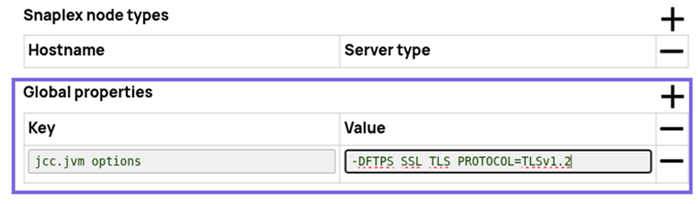
-
This Snap Pack no longer natively supports RSA-SHA1 authentication with the Secure File Transfer Protocol (SFTP). To enable support for RSA-SHA1 authentication, set the following property from the Node Properties section of Configuration Options:
-Djsch.server_host_key=ssh-rsa -Djsch.client_pubkey=ssh-rsa
Snap views
| Type | Description | Examples of upstream and downstream Snaps |
|---|---|---|
| Input | This Snap has exactly one binary input view. Binary documents to be put together into a single binary output document |
|
| Output | This Snap has exactly one binary output view. A "multipart" binary document that contains the input documents. |
|
| Learn more about Error handling. | ||
Snap settings
- Expression icon (
 ): Allows using
pipeline parameters to set field values dynamically (if enabled). SnapLogic Expressions
are not supported. If disabled, you can provide a static value.
): Allows using
pipeline parameters to set field values dynamically (if enabled). SnapLogic Expressions
are not supported. If disabled, you can provide a static value. - SnapGPT (
 ): Generates SnapLogic Expressions
based on natural language using SnapGPT. Learn
more.
): Generates SnapLogic Expressions
based on natural language using SnapGPT. Learn
more. - Suggestion icon (
 ): Populates a
list of values dynamically based on your Snap configuration. You can select only one
attribute at a time using the icon. Type into the field if it supports a comma-separated
list of values.
): Populates a
list of values dynamically based on your Snap configuration. You can select only one
attribute at a time using the icon. Type into the field if it supports a comma-separated
list of values. - Upload
 : Uploads files. Learn more.
| Field/Field set | Type | Description |
|---|---|---|
Label
|
String | Required. Specify a unique name for the Snap. Modify this to be more appropriate, especially if more than one of the same Snaps is in the pipeline. Default value: Multipart Writer Example: Multipart Writer |
| Binary Header Properties | The binary output document header can be modified by specifying properties in this table property. The "expression" column computes the value to insert and the "Target Path" is a JSONPath where the value should be set in the header. The headers are initially populated with the headers from the parts in the stream. These properties allow you to carryover values from the original multipart input document to the binary output documents. | |
| Expression | Dropdown list/Expression | The value to insert into the header. |
| Target path | String/Suggestion | The path where the result of the expression should be written to in the
header. Example: $['content-location'] |
| Group Identifier | Dropdown list/Expression | This property can be used to generate multiple binary output documents. By default, the Snap generates a single binary document containing parts for all of the input documents. If you need to generate multiple binary output documents, you can use this property to close out the previous document and start a new one. The property is treated as an identifier for each "group". The value of the identifier isn't meaningful to the Snap. It is only looking to see if the values changes from one input document to the next. When the value does change, then a new output document is started. |
| Snap execution
|
Dropdown list |
Choose one of the three modes in
which the Snap executes. Available options are:
Default value: Execute only Example: Validate & Execute |