


API Suite - Google Service Account
Overview
You can use this account type to connect the HTTP Client Snap with Google Cloud endpoints, such as Analytics 4 and Compute Engine.
Prerequisites
-
Service Account in the Google Cloud. Learn more: How to create a Service Account in the Google Cloud console.
- Custom role access for the Service account. Learn more: How to create and manage custom roles. Add the following
permissions to the custom role (insufficient permissions causes the Snap to fail):
-
storage.objects.get (Read)
-
storage.objects.list (Read)
-
storage.objects.create (Write)
-
storage.objects.update (Write)
-
storage.objects.delete (Write)
-
storage.buckets.list (required for Snap Account Validation)
-
-
JSON file containing the public/private key pair. This file is downloaded to your machine when you create the Google Service Account. You need to upload it to the Files. Learn more: Service account keys.
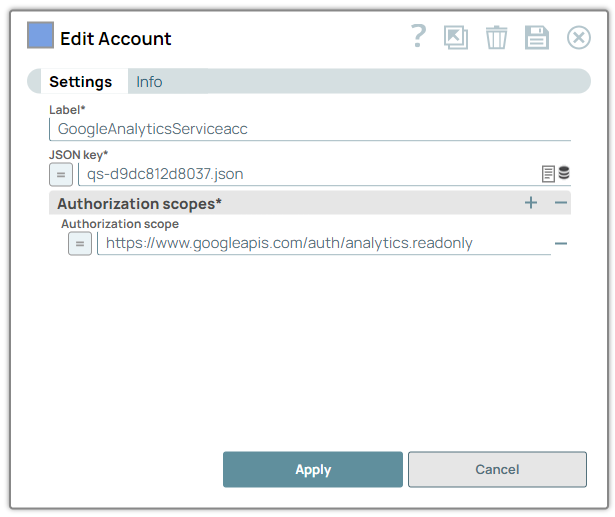
Account settings
- Expression icon (
 ): Allows using
JavaScript syntax to access SnapLogic Expressions to set field values dynamically (if
enabled). If disabled, you can provide a static value. Learn more.
): Allows using
JavaScript syntax to access SnapLogic Expressions to set field values dynamically (if
enabled). If disabled, you can provide a static value. Learn more. - SnapGPT (
 ): Generates SnapLogic Expressions
based on natural language using SnapGPT. Learn
more.
): Generates SnapLogic Expressions
based on natural language using SnapGPT. Learn
more. - Suggestion icon (
 ): Populates a
list of values dynamically based on your Snap configuration. You can select only one
attribute at a time using the icon. Type into the field if it supports a comma-separated
list of values.
): Populates a
list of values dynamically based on your Snap configuration. You can select only one
attribute at a time using the icon. Type into the field if it supports a comma-separated
list of values. - Upload
 : Uploads files. Learn more.
| Field/Field set | Type | Description |
|---|---|---|
| Label
|
Required. Specify a unique label for the
account. Default value: N/A Example: Google Service Account |
|
| JSON Key
|
Required. Specify the JSON
key created for the service account. Learn more about generating JSON keys. Note:
Relative path of the JSON key in the SLDB:
Default value: N/A Example: fluid-tix-21901-9f2k4n17bc.json |
|
| Authorization scopes | Use this field set to define the authorization scopes to be requested. | |
| Authorization scope
|
Specify the OAuth2.0 scope to be requested. You
can provide multiple authorization scopes either in the same field (space-separated)
or different rows. Note: To use the access token for the HTTP Client Snap, enable
expressions for the field and enter
account.access_token.Default value: N/A Example: https://www.googleapis.com/auth/drive |
|