


ZipFile Read
Overview
You can use this Snap to extract files from an archive file and write them to the binary output view.
We plan to introduce additional S3 features exclusively in Amazon S3 Snaps, while Binary Snaps with S3 support will not contain these updates. Therefore, we recommend you to use the Amazon S3 Snap Pack for all your S3 operations within your pipelines. However, Binary Snaps will be retained as is to maintain backward compatibility, but be aware that we will no longer provide S3 support for the Binary Snaps.
Learn more: Migrate from Binary to S3 Snaps.
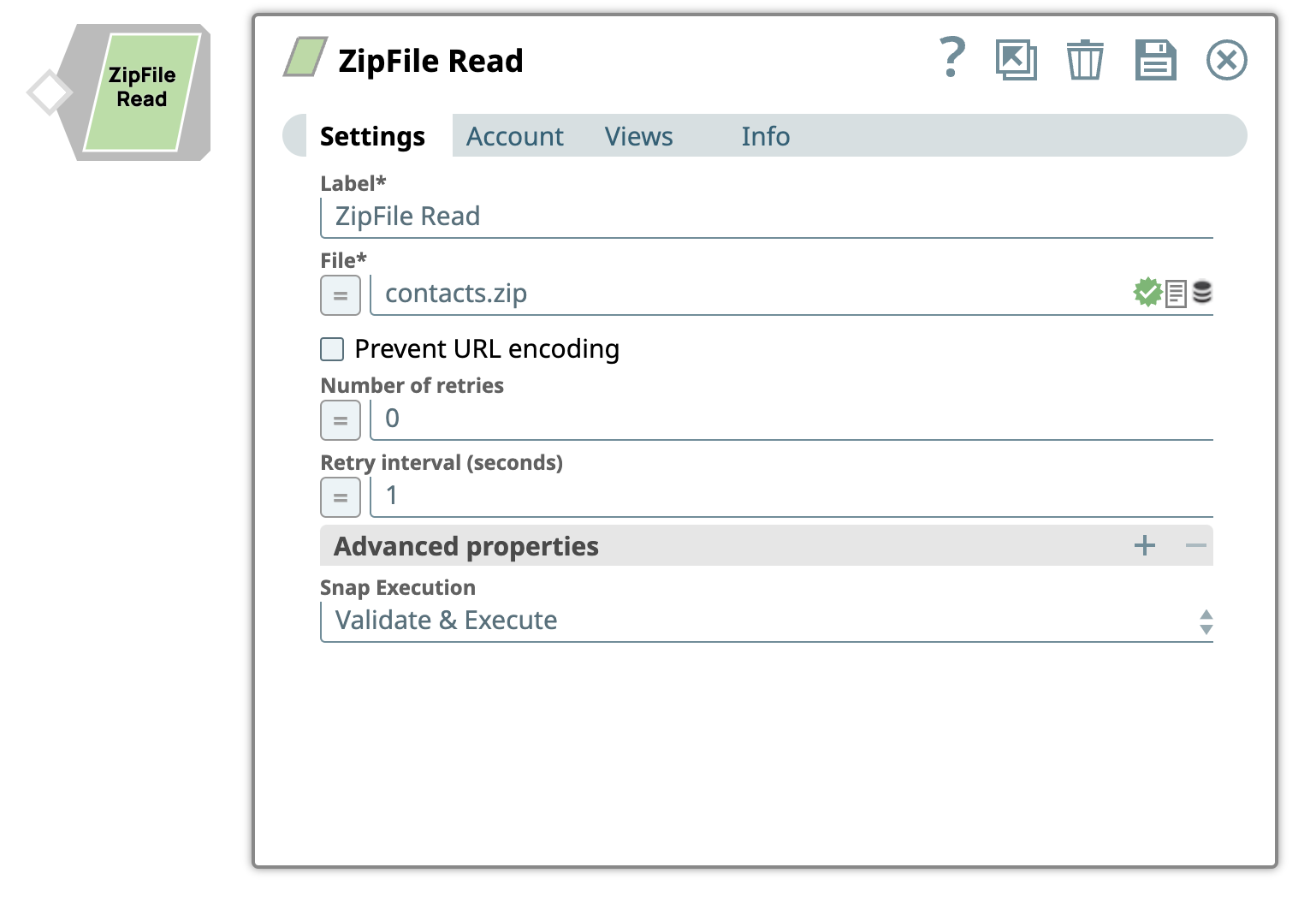
- This is a Read-type Snap.
 Does not support Ultra Tasks
Prerequisites
The 'IAM_CREDENTIAL_FOR_S3' feature is used to
access S3 files from EC2 Groundplex, without Access-key ID and Secret key in the AWS S3
account in the Snap. The IAM credential stored in the EC2 metadata is used to gain access
rights to the S3 buckets. To enable this feature, set the Global properties (Key-Value
parameters) and restart the JCC:jcc.jvm_options =
-DIAM_CREDENTIAL_FOR_S3=TRUE
This feature is supported in the EC2-type Groundplex only. Learn more.
Connect to FTP server:
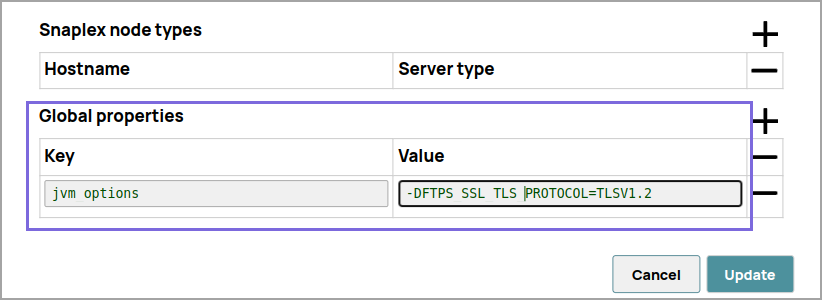
To connect to the FTP server that needs to reuse the session for data transfer over TLS protocol, add:
-DFTPS_SSL_TLS_PROTOCOL=TLSV1.2 (or)
						TLSV1.3
property as a JVM option under the Global
properties of the Node Properties tab:
Known issues
-
The Binary Snap Pack no longer natively supports RSA-SHA1 authentication with the Secure File Transfer Protocol (SFTP). To enable support for RSA-SHA1 authentication, set the following property from the Node Properties section of Configuration Options:
-Djsch.server_host_key=ssh-rsa -Djsch.client_pubkey=ssh-rsa
With the 4.33 GA release of the
Binary Snap Pack
, support for some algorithms for SFTP
connection negotiation is removed for improved security and because we’ve updated the
library used to connect to SFTP sources. If you want to revert to the previous settings,
you can set the following jcc.jvm_options from the Node Properties
section of Configuration Options. To update Cloudplexes, contact
support@snaplogic.com.
-Djsch.kex=ecdh-sha2-nistp256,ecdh-sha2-nistp384,ecdh-sha2-nistp521,diffie-hellman-group14-sha1,diffie-hellman-group-exchange-sha256,diffie-hellman-group-exchange-sha1,diffie-hellman-group1-sha1-Djsch.server_host_key=ssh-rsa,ssh-dss,ecdsa-sha2-nistp256,ecdsa-sha2-nistp384,ecdsa-sha2-nistp521-Djsch.client_pubkey=ssh-rsa,ssh-dss,ecdsa-sha2-nistp256,ecdsa-sha2-nistp384,ecdsa-sha2-nistp521-Djsch.cipher=aes128-ctr,aes128-cbc,3des-ctr,3des-cbc,blowfish-cbc,aes192-ctr,aes192-cbc,aes256-ctr,aes256-cbc-Djsch.check_ciphers=aes256-ctr,aes192-ctr,aes128-ctr,aes256-cbc,aes192-cbc,aes128-cbc,3des-ctr,arcfour,arcfour128,arcfour256-Djsch.check_kexes=diffie-hellman-group14-sha1,ecdh-sha2-nistp256,ecdh-sha2-nistp384,ecdh-sha2-nistp521-Djsch.check_signatures=ecdsa-sha2-nistp256,ecdsa-sha2-nistp384,ecdsa-sha2-nistp521
Account
This Snap uses account references created on the Accounts page of SnapLogic Manager to handle access to this endpoint. This Snap supports a Basic auth account, an AWS S3 auth account, SSH Auth account, SMB account, or no account. See Configuring Binary accounts for information on setting up accounts that work with this Snap.
Account types supported by each protocol are as follows:
| Protocol | Account types |
|---|---|
| sldb | no account |
| s3 | AWS S3 |
| ftp | Basic Auth |
| sftp | Basic Auth, SSH Auth |
| ftps | Basic Auth |
| hdfs | no account |
| http | no account |
| https | no account |
| smb | SMB |
| wasb | Azure Storage |
| wasbs | Azure Storage |
| gs | Google Storage |
Required settings for account types are as follows:
| Account Type | Settings |
|---|---|
| AWS S3 Account | Access-key ID, Secret key |
| SSH Auth Account | Username, Private key, Key Passphrase |
| SMB Account | Domain, Username, Password |
| Azure Storage Account | Account name, Primary access key |
| Google Storage Account |
Approval prompt, Application scope, Auto-refresh token (Read-only properties are Access token, Refresh token, Access token expiration, OAuth2 Endpoint, OAuth2 token and Access type.) |
Snap views
| Type | Description | Examples of upstream and downstream Snaps |
|---|---|---|
| Input | The Snap does not require input data. Input documents may be used to evaluate any JavaScript expression in the File property. It may contain value(s) to evaluate the JavaScript expression in the File property. |
|
| Output |
Binary data read from the source specified in the File property with header information about the binary stream. Each file extracted from the provided zip file is written as binary object to this output view. The header of the binary object has details about the file extracted like content-location, content-type, content-length, last-modified, and zip-filename. |
|
| Learn more about Error handling. | ||
Snap settings
| Field/Field set | Description |
|---|---|
Label
|
Required. Specify a unique name for the Snap. Modify this
to be more appropriate, especially if more than one of the same Snaps is in the
pipeline. Default value: ZipFile Read Example: ZipFile Read |
| File
|
Required. Specify the URL for the zip file
source. It should start with a file protocol. The supported file protocols are:
This Snap supports S3 Virtual Private Cloud (VPC) endpoint. Note:
Refer to : Acceptable File Paths Warning: Lint Warning The Snap displays a
Lint Warning in your Pipeline in the following scenarios:
Therefore, we recommend that you confirm to any of the acceptable
relative paths. Otherwise, use an absolute path—that is provide a file path that
belongs to the same org where you want to write the file, or use the File Upload
Default value: None. Example: contact.zip |
| Prevent URL encoding
|
Select this checkbox to prevent the Snap from automatically encoding the URL
file path (including the query string if it exists) and use the file path value
as-is. Refer to Encoding of characters in a URL Default status: Deselected |
| Number of retries
|
Specify the maximum number of retry attempts that the Snap must make in case there is a network failure, and the Snap is unable to read the target file. If the value is larger than 0, the Snap first downloads the target file to a temporary zip file. If any error occurs during the download, the Snap waits for the time specified in the Retry interval and attempts to download the file again from the beginning. When the download is successful, the Snap starts to unzip the data and stream the data from the temporary file to the downstream Pipeline. All temporary local files are deleted when they are no longer needed. Tip: Ensure that the local drive has sufficient free disk space to store
the temporary local file.
Minimum value: 0 Default value: 0 Example: 3 |
| Retry interval (seconds)
|
Specify the minimum number of seconds for which the Snap must wait before
attempting recovery from a network failure. Minimum value: 1 Default value: 1 Example: 3 |
| Advanced properties | Use this field set to define additional properties for the Snap. |
| SAS URI
|
The URI of the Shared Access Storage (SAS) to be accessed. Supported SAS types are:
Warning: If you specify the SAS URI value in the Snap settings,
then the settings provided in the account (if any account is attached) are
ignored. |
| Values
|
Provide a value for the SAS URI. |
| Snap execution
|
Choose one of the three modes in
which the Snap executes. Available options are:
Default value: Execute only Example: Validate & Execute |
 icon to specify the File
path.
icon to specify the File
path.Acceptable File Paths
- Relative paths
filename.json: Saves the file in the project.../shared/filename.json: Saves the file in the Project Shared Space.../../shared/filename.json: Saves the files in the Org Shared project.
- Absolute path
-
/<org>/<projectSpace>/<project>/filename.json
-
Encoding of Characters in a URL
The following are some of the common characters that are automatically encoded by the Snap:
| Character name | Character | URL Encoded value |
|---|---|---|
| backslash | \ | %5C |
| Pound | # | %23 |
| space | %20 | |
| percent | % | %25 |
| Left-angle | < | %3C |
| Right-angle | > | %3E |
| Left-square | [ | %5B |
| Right-square | ] | %5D |
| Left-curly | { | %7B |
| Right-curly | } | %7D |
These are some of the characters that are not automatically encoded by the Snap:
| Character name | Character | URL Encoded value |
|---|---|---|
| ampersand | & | %26 |
| colon | : | %3A |
| comma | , | %2C |
| dollar | $ | %24 |
| equals | = | %3D |
| forward slash | / | %2F |
| plus | + | %2B |
| question mark | ? | %3F |
| semi-colon | ; | %3B |