


AWS Signature V4 Account
Overview
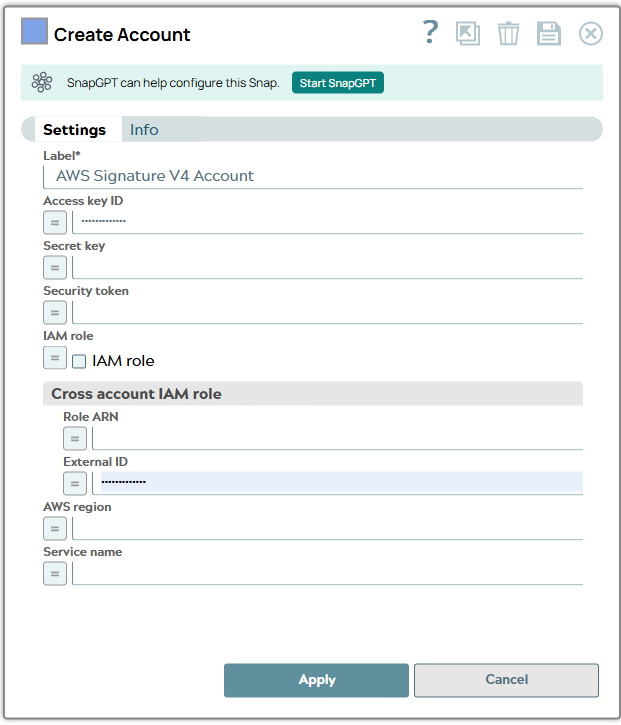
You can use this account type to connect the HTTP Client Snap with data sources that use the AWS Signature V4 account. Amazon Web Services (AWS) Signature Version 4 is the process of adding authentication information to AWS requests sent by the HTTP client.
Known issues
This account does not support Virtual Private Cloud for the HTTP Client Snap.
Account settings
- Expression icon (
 ): Allows using
JavaScript syntax to access SnapLogic Expressions to set field values dynamically (if
enabled). If disabled, you can provide a static value. Learn more.
): Allows using
JavaScript syntax to access SnapLogic Expressions to set field values dynamically (if
enabled). If disabled, you can provide a static value. Learn more. - SnapGPT (
 ): Generates SnapLogic Expressions
based on natural language using SnapGPT. Learn
more.
): Generates SnapLogic Expressions
based on natural language using SnapGPT. Learn
more. - Suggestion icon (
 ): Populates a
list of values dynamically based on your Snap configuration. You can select only one
attribute at a time using the icon. Type into the field if it supports a comma-separated
list of values.
): Populates a
list of values dynamically based on your Snap configuration. You can select only one
attribute at a time using the icon. Type into the field if it supports a comma-separated
list of values. - Upload
 : Uploads files. Learn more.
| Field/Field set | Type | Description |
|---|---|---|
| Label String |
Required. Specify a unique label for the
account. Default value: N/A Example: AWS Signature V4 Account |
|
| Access Key ID String/Expression |
Specify the access key ID for AWS
authentication. Default value: N/A Example: Auikj8647IJKL1MPQ= |
|
| Secret Key String/Expression |
Specify the secret key associated for the AWS
authentication. Default value: N/A Example: aBcdeFGhiJKLM/N1O |
|
| Security Token String/Expression |
Specify the security token obtained from the AWS
Security Token Service (STS) to access AWS resources. Note that only global STS
regions are supported. Default value: N/A Example: FwoGYXdzEGUaDFInugbfGX8xlGA4ZwNV3uSQBjIre4G7AXvfuGO2Fq41wKGc4TcSknLVYpI2aKf9z21+7oszQ== |
|
| IAM role Checkbox |
Select this checkbox to authenticate as the IAM
role assigned to the EC2 instance to access the AWS resources (with appropriate
permissions). The IAM role is valid only in Groundplex nodes hosted in the EC2
environment. Learn more about
Configuring an EC2 role for IAM Role in AWS S3 Account
. When you select this checkbox:
Warning: Account validation fails if this setting is used on
a Snaplex that is not running on an EC2 instance. Default status: Deselected |
|
| Cross account IAM role | Use this field set to configure the properties required to perform cross-account access. Learn more about Configuring Cross Account IAM Role Support . | |
| Role ARN String/Expression |
Specify the Amazon Resource Name (ARN) of the IAM
role that should be assumed to access AWS resources. This role can be within the
same account as the user/IAM instance or cross-account to access a different
account's AWS resources. Default value: N/A Example: arn:aws:s3:::sandbox-test-snap |
|
| External ID String/Expression |
Optional. Specify the
external ID required to assume the role, if the role is configured with one. Default value: N/A Example: 321f248c-8f4a-21be-87c4-184c9f8e2d03 |
|
| AWS Region String/Expression |
Specify the AWS Region for constructing the
authorization header. Default value: N/A Example: us-west-2 |
|
| Service Name String/Expression |
Specify the Service Name for constructing
the authorization header. Default value: N/A Example: S3 |
|