


AgentCreator Architecture and Design
The SnapLogic platform lets you connect to multiple data sources, create prompts, and interact with large language models (LLMs) through a single user interface. In SnapLogic AgentCreator, an agent is a group of SnapLogic pipelines. With AgentCreator, you can design simple, goal-based agents. You can also build multilayered agents that include subagents for more complex tasks.
This article covers the following topics:
- AgentCreator pipeline architecture
- AgentCreator pipeline design considerations
AgentCreator pipelines power agent operations. They can connect to any data source supported by SnapLogic Snaps. You can build the user interface for these agents using your organization’s tools or platforms such as Streamlit. For example, SnapLogic AgentCreator can handle the agent’s back-end APIs, while Streamlit provides the user interface.
For example, in this solution, SnapLogic AgentCreator handles the back-end APIs while Streamlit powers the agent end-user interface.
Architectural Components
The agent loop
The core of the agent pipeline pattern is the agent loop. In this loop:
- Agent pipelines process incoming requests (prompts) and send them through the loop.
- Agents contain tool definitions, which correspond to the available tools the Agent has access to.
- Send the response back.
- Iterate on the prompt by sending the request back to the tool pipelines to collect more data. In this context, the tools can be RAG pipelines.
Agent Snap
The Agent Snap can be used as a substitute for your worker agent pipeline, simplifying the agent design. Provided in each LLM Snap Pack, the Agent Snap consolidates tool calling and chat completions while integrating with Agent Visualizer. You can add an Agent Snap to a driver pipeline, and it will call the required tools. Because the Agent Snap is LLM vendor dependent, the pipeline design might be more restrictive than the conventional agent pipeline design.
Each LLM Snap Pack contains an Agent Snap:
Tool Pipelines
Tool pipelines are the actual tools the Agent pipeline calls.
For example, an agent assisting with near-term travel planning might retrieve the temperature using a tool from a weather website. As the agent end user, you would enter a prompt into an input field through an application interface.
Operationally, that prompt input is sent as a request to the Agent Snap, which carries out iterations, interacting with the tools. The response is then passed back through the loop, in case more iteration on the request is required.
The following diagram illustrates the request flow in tool pipelines:
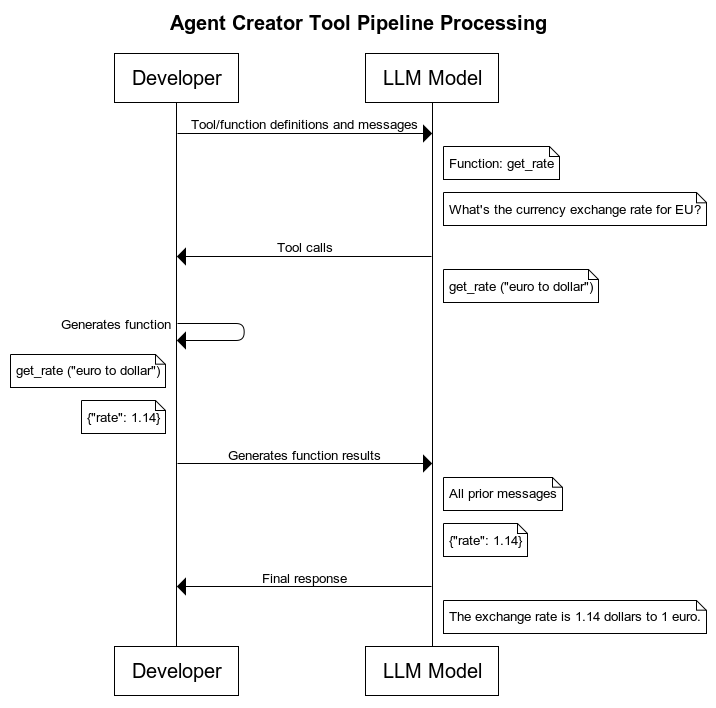
The processing is accomplished through four types of Snaps found in each LLM Snap Pack:
You can also call multiple functions from the Multi Pipeline Function Generator Snap. Learn more about how to streamline the designs of your agent pipelines through efficient tool calling.
Design considerations
SnapLogic AgentCreator solution allows flexibility in Agent pipeline design. Review the following sections to understand key design considerations.
LLM Vendors and Models
Agent pipeline design and configuration depend on the LLM vendor and model you plan to use. Snap Packs support multiple operations in LLMs and various types of accounts. An Agent Snap is in each LLM vendor Snap Pack. Similar capabilities are supported with the same patterns for consistency across the different LLM vendor Snap Packs.
Account references
For easy account management, SnapLogic supports the downstream reference of LLM Snap accounts. When you select a model for your Agent Snap, you can reference the same account to access the LLM in the tool pipeline via pipeline parameters.
System prompt
Defining a role for agents and their subagents is an important part of returning output in a format that suits your usecase. You can define the role of the agent by selecting the system prompt in the appropriate Snap for the LLM vendor/model.
The system prompt is for the model to understand the persona it should adopt (displayed in the UI as the field Role). While not required, creating a system prompt makes things easier by creating a set of instructions for the LLM, as opposed to sending a request.
You can leverage the system prompt for the underlying system receiving the prompt input. This enables you to create layers of agents.
JSON mode
JSON mode is for the model to output in JSON format. JSON format can be leveraged relaying output data from the LLM to other systems.
For agents that rely on LLM thinking and reasoning models, structured outputs can be leveraged for specific formatting input and output requirements.
To get started, refer to the following articles: